Beställt på vardagar före 14:00 = skickas samma dag. 30 dagars ångerrätt

Kopplingsschema och kodexempel

Så här kopplar du Mini OLED-display vit 0,96 tum 128x64 I2C till en Arduino UNO eller ESP32, med ett exempel­sketch som du kan ladda upp direkt.

0.96-inch I2C OLED Display Demo

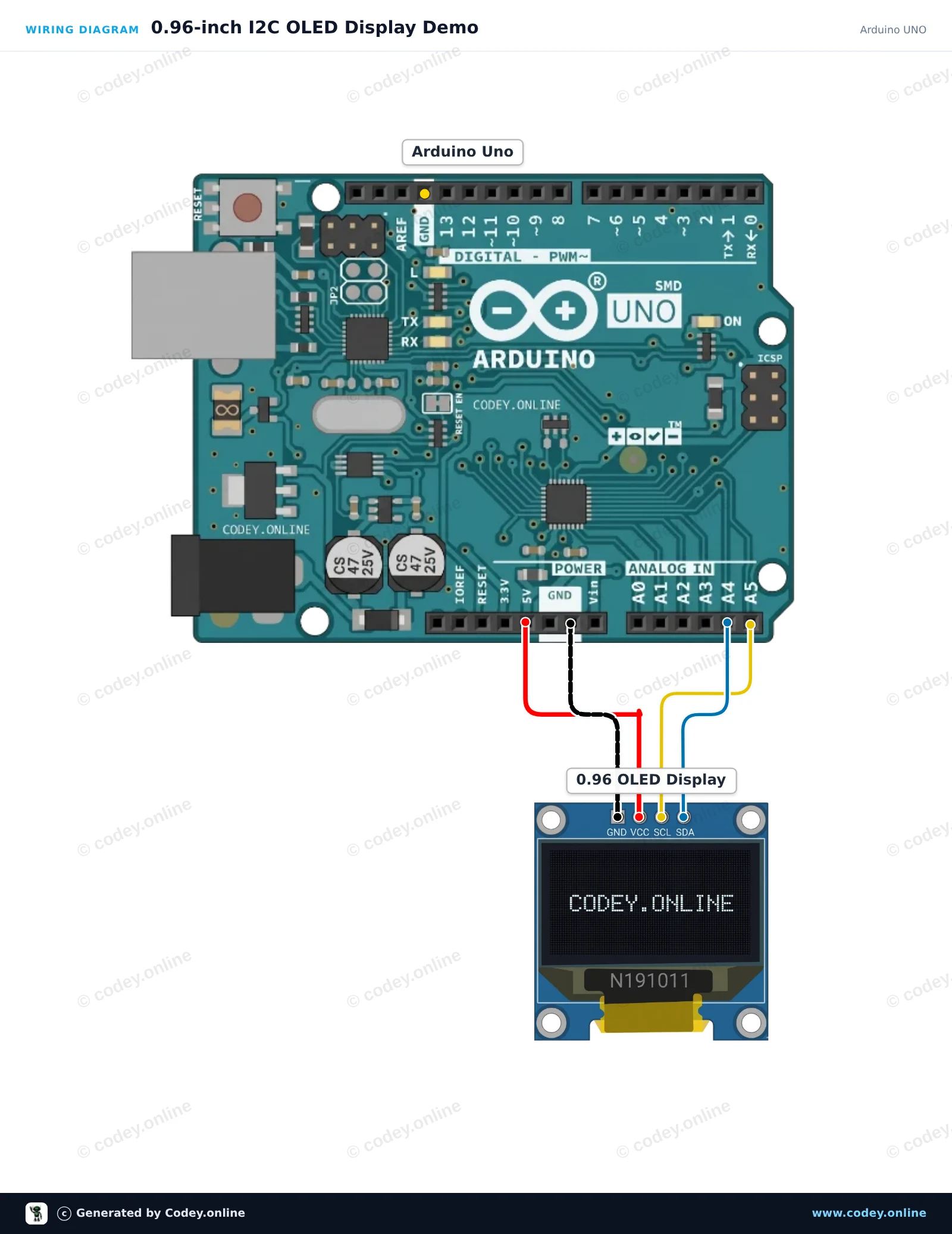
Connect the 0.96-inch 128x64 I2C OLED display directly to the Arduino Uno's I2C pins (A4 for SDA, A5 for SCL). This sketch uses standard I2C commands to initialize the SSD1306 controller and displays a live counter and text directly without requiring external graphics libraries.

Kopplingsschema: Mini OLED-display vit 0,96 tum 128x64 I2C på en Arduino UNO
Kopplingsschema · Klicka för att förstora
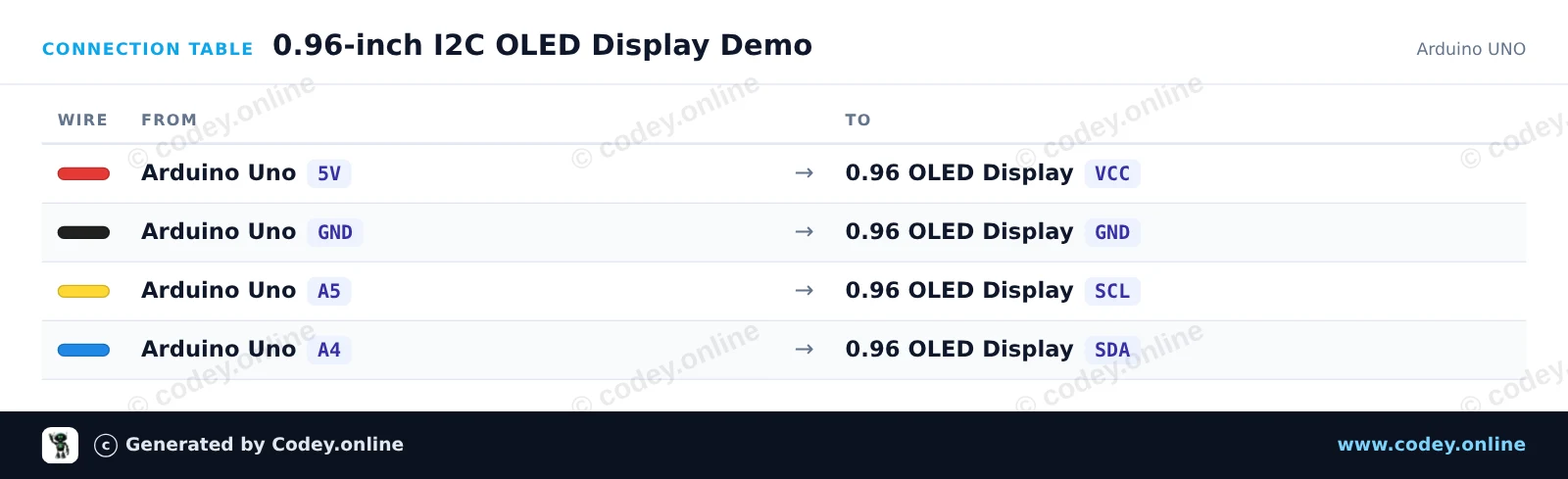
Kopplingstabell: Mini OLED-display vit 0,96 tum 128x64 I2C på en Arduino UNO
Kopplingstabell · Klicka för att förstora
0_96_inch_I2C_OLED_Display_Demo.ino · kompilerad och testad
/*
 * ==================================================================
 *  Generated by Codey.online  —  https://www.codey.online
 * ==================================================================
 *  Project   : 0.96-inch I2C OLED Display Demo
 *  Board     : Arduino UNO (arduino:avr:uno)
 *  Parts     : OLED Display 0.96 inch
 *  Libraries : none (built-in)
 *
 *  Codey Online is an AI-powered browser IDE for Arduino and ESP32.
 *  Describe your project and Codey writes the code, draws the wiring
 *  diagram and uploads it to your board, straight from the browser.
 *  This code is free to use, modify and share, without warranty.
 * ==================================================================
 */

#include <Wire.h>

const uint8_t OLED_ADDR = 0x3C;
const uint8_t OLED_WIDTH = 128;
const uint8_t OLED_HEIGHT = 64;
uint8_t buffer[1024];
int counter = 0;

const uint8_t font5x7[][5] = {
  {0x00, 0x00, 0x00, 0x00, 0x00}, // space
  {0x7E, 0x11, 0x11, 0x11, 0x7E}, // A
  {0x7F, 0x49, 0x49, 0x49, 0x36}, // B
  {0x3E, 0x41, 0x41, 0x41, 0x22}, // C
  {0x7F, 0x41, 0x41, 0x22, 0x1C}, // D
  {0x7F, 0x49, 0x49, 0x49, 0x41}, // E
  {0x7F, 0x09, 0x09, 0x09, 0x01}, // F
  {0x3E, 0x41, 0x49, 0x49, 0x7A}, // G
  {0x7F, 0x08, 0x08, 0x08, 0x7F}, // H
  {0x00, 0x41, 0x7F, 0x41, 0x00}, // I
  {0x7F, 0x40, 0x40, 0x40, 0x40}, // L
  {0x7F, 0x02, 0x0C, 0x02, 0x7F}, // M
  {0x7F, 0x04, 0x08, 0x10, 0x7F}, // N
  {0x3E, 0x41, 0x41, 0x41, 0x3E}, // O
  {0x7F, 0x09, 0x09, 0x09, 0x06}, // P
  {0x7F, 0x09, 0x19, 0x29, 0x46}, // R
  {0x46, 0x49, 0x49, 0x49, 0x31}, // S
  {0x01, 0x01, 0x7F, 0x01, 0x01}, // T
  {0x3F, 0x40, 0x40, 0x40, 0x3F}, // U
  {0x3E, 0x51, 0x49, 0x45, 0x3E}, // 0
  {0x00, 0x42, 0x7F, 0x40, 0x00}, // 1
  {0x42, 0x61, 0x51, 0x49, 0x46}, // 2
  {0x21, 0x41, 0x45, 0x4B, 0x31}, // 3
  {0x18, 0x14, 0x12, 0x7F, 0x10}, // 4
  {0x27, 0x45, 0x45, 0x45, 0x39}, // 5
  {0x3C, 0x4A, 0x49, 0x49, 0x30}, // 6
  {0x01, 0x71, 0x09, 0x05, 0x03}, // 7
  {0x36, 0x49, 0x49, 0x49, 0x36}, // 8
  {0x06, 0x49, 0x49, 0x29, 0x1E}, // 9
  {0x00, 0x36, 0x36, 0x00, 0x00}, // :
  {0x00, 0x60, 0x60, 0x00, 0x00}  // .
};

int charIndex(char c) {
  if (c >= 'a' && c <= 'z') c -= 32;
  if (c == ' ') return 0;
  if (c == 'A') return 1; if (c == 'B') return 2; if (c == 'C') return 3;
  if (c == 'D') return 4; if (c == 'E') return 5; if (c == 'F') return 6;
  if (c == 'G') return 7; if (c == 'H') return 8; if (c == 'I') return 9;
  if (c == 'L') return 10; if (c == 'M') return 11; if (c == 'N') return 12;
  if (c == 'O') return 13; if (c == 'P') return 14; if (c == 'R') return 15;
  if (c == 'S') return 16; if (c == 'T') return 17; if (c == 'U') return 18;
  if (c >= '0' && c <= '9') return 19 + (c - '0');
  if (c == ':') return 29;
  if (c == '.') return 30;
  return 0;
}

void sendCmd(uint8_t cmd) {
  Wire.beginTransmission(OLED_ADDR);
  Wire.write(0x00);
  Wire.write(cmd);
  Wire.endTransmission();
}

void sendCmd2(uint8_t cmd, uint8_t val) {
  Wire.beginTransmission(OLED_ADDR);
  Wire.write(0x00);
  Wire.write(cmd);
  Wire.write(val);
  Wire.endTransmission();
}

void clearDisplay() {
  memset(buffer, 0, sizeof(buffer));
}

void setPixel(int x, int y, bool state) {
  if (x < 0 || x >= OLED_WIDTH || y < 0 || y >= OLED_HEIGHT) return;
  int idx = x + (y / 8) * OLED_WIDTH;
  if (state) buffer[idx] |= (1 << (y % 8));
  else buffer[idx] &= ~(1 << (y % 8));
}

void printText(int x, int y, const char* str) {
  while (*str) {
    int idx = charIndex(*str++);
    for (int col = 0; col < 5; col++) {
      uint8_t line = font5x7[idx][col];
      for (int row = 0; row < 7; row++) {
        setPixel(x + col, y + row, (line >> row) & 1);
      }
    }
    x += 6;
  }
}

void updateDisplay() {
  sendCmd(0x20); sendCmd(0x00);
  sendCmd2(0x21, 0x00); sendCmd(0x7F);
  sendCmd2(0x22, 0x00); sendCmd(0x07);
  for (uint16_t i = 0; i < 1024; i += 16) {
    Wire.beginTransmission(OLED_ADDR);
    Wire.write(0x40);
    for (uint8_t j = 0; j < 16; j++) {
      Wire.write(buffer[i + j]);
    }
    Wire.endTransmission();
  }
}

void setup() {
  Serial.begin(115200);
  Wire.begin();
  delay(50);
  sendCmd(0xAE); sendCmd2(0xD5, 0x80); sendCmd2(0xA8, 0x3F);
  sendCmd2(0xD3, 0x00); sendCmd(0x40); sendCmd2(0x8D, 0x14);
  sendCmd(0xA1); sendCmd(0xC8); sendCmd2(0xDA, 0x12);
  sendCmd2(0x81, 0xCF); sendCmd2(0xD9, 0xF1); sendCmd2(0xDB, 0x40);
  sendCmd(0xA4); sendCmd(0xA6); sendCmd(0xAF);
  Serial.println(F("OLED Initialized"));
}

void loop() {
  clearDisplay();
  printText(0, 0, "OLED 0.96 INCH");
  printText(0, 16, "ARDUINO UNO");
  
  char buf[16];
  itoa(counter, buf, 10);
  printText(0, 32, "COUNT: ");
  printText(42, 32, buf);

  int barWidth = (counter % 120);
  for (int x = 0; x <= barWidth; x++) {
    for (int y = 48; y < 58; y++) {
      setPixel(x, y, true);
    }
  }

  updateDisplay();
  counter++;
  delay(100);
}

Wiring diagram and example code generated by Codey.online — https://www.codey.online

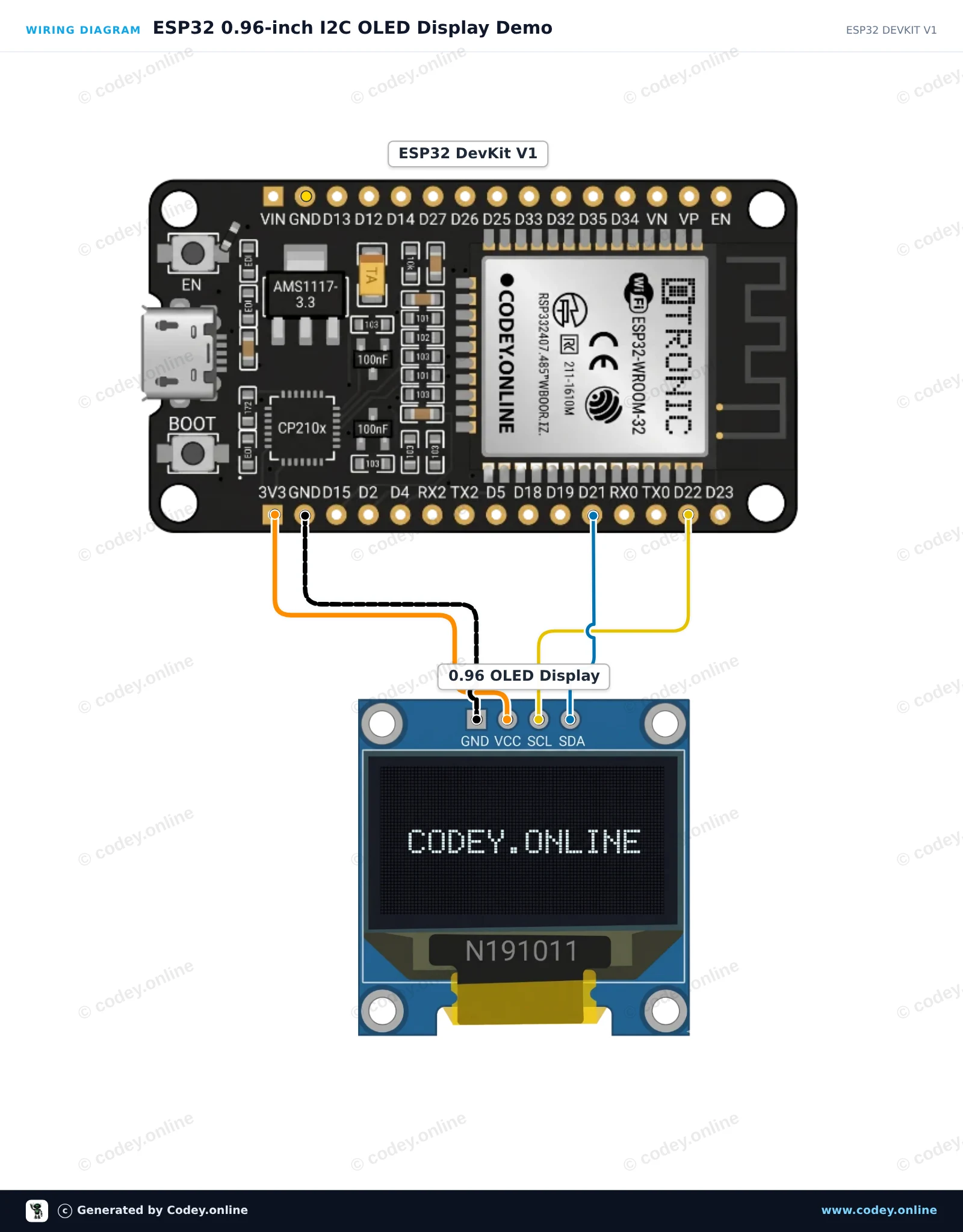
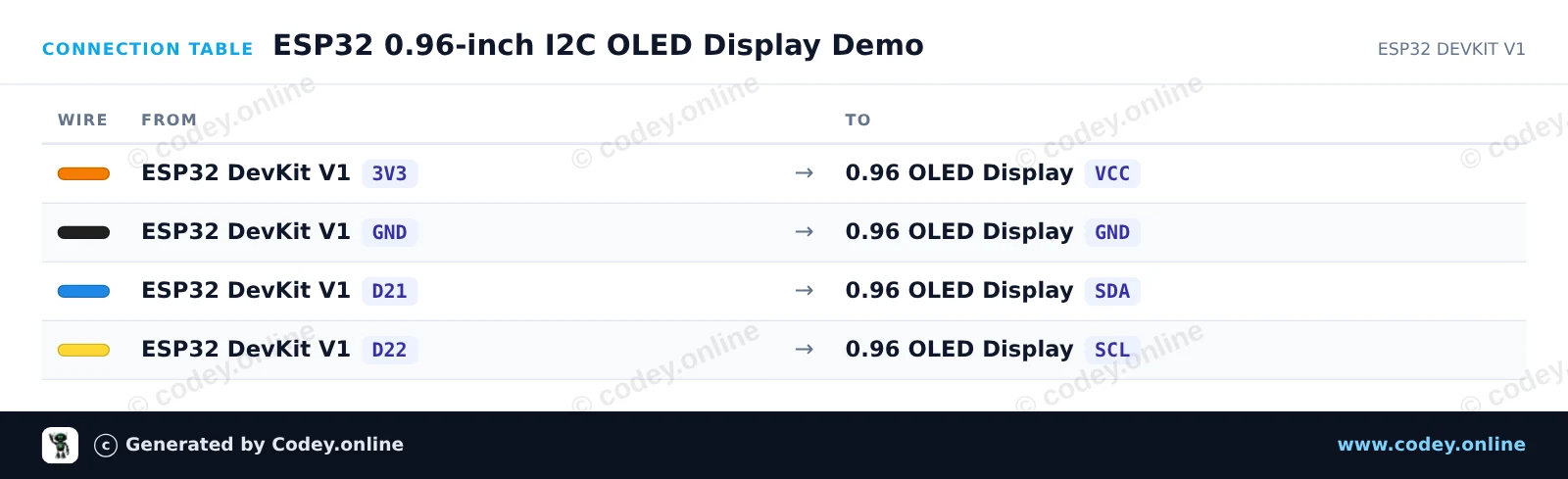
ESP32 0.96-inch I2C OLED Display Demo

This project demonstrates how to connect and display text and numbers on a 0.96-inch I2C OLED screen using the ESP32. The sketch initializes the display and updates a live counter every second. Make sure to install the Adafruit SSD1306 and Adafruit GFX libraries before uploading.

Kopplingsschema: Mini OLED-display vit 0,96 tum 128x64 I2C på en ESP32 DevKit V1
Kopplingsschema · Klicka för att förstora
Kopplingstabell: Mini OLED-display vit 0,96 tum 128x64 I2C på en ESP32 DevKit V1
Kopplingstabell · Klicka för att förstora
ESP32_0_96_inch_I2C_OLED_Display_Demo.ino · kompilerad och testad
/*
 * ==================================================================
 *  Generated by Codey.online  —  https://www.codey.online
 * ==================================================================
 *  Project   : ESP32 0.96-inch I2C OLED Display Demo
 *  Board     : ESP32 DEVKIT V1 (esp32:esp32:esp32doit-devkit-v1)
 *  Parts     : OLED Display 0.96 inch
 *  Libraries : Adafruit SSD1306 2.5.16, Adafruit GFX Library 1.12.6
 *
 *  Codey Online is an AI-powered browser IDE for Arduino and ESP32.
 *  Describe your project and Codey writes the code, draws the wiring
 *  diagram and uploads it to your board, straight from the browser.
 *  This code is free to use, modify and share, without warranty.
 * ==================================================================
 */

#include <Wire.h>
#include <Adafruit_GFX.h>
#include <Adafruit_SSD1306.h>

#define SCREEN_WIDTH 128
#define SCREEN_HEIGHT 64
#define OLED_RESET    -1
#define SCREEN_ADDRESS 0x3C

Adafruit_SSD1306 display(SCREEN_WIDTH, SCREEN_HEIGHT, &Wire, OLED_RESET);

int counter = 0;

void setup() {
  Serial.begin(115200);

  // Initialize I2C on ESP32 default pins (SDA: 21, SCL: 22)
  Wire.begin(21, 22);

  if (!display.begin(SSD1306_SWITCHCAPVCC, SCREEN_ADDRESS)) {
    Serial.println(F("SSD1306 allocation failed"));
    while (true); // Freeze
  }

  display.clearDisplay();
  display.setTextColor(SSD1306_WHITE);
  display.setTextSize(1);
  display.setCursor(0, 0);
  display.println("ESP32 OLED Test");
  display.display();
  delay(1500);
}

void loop() {
  display.clearDisplay();

  // Header text
  display.setTextSize(1);
  display.setCursor(0, 0);
  display.println("ESP32 + SSD1306");

  // Separator line
  display.drawLine(0, 12, 127, 12, SSD1306_WHITE);

  // Counter display
  display.setCursor(0, 20);
  display.println("Counter value:");
  
  display.setTextSize(2);
  display.setCursor(0, 36);
  display.print(counter);

  display.display();

  counter++;
  delay(1000);
}

Nödvändiga bibliotek: Adafruit SSD1306 2.5.16, Adafruit GFX Library 1.12.6

Wiring diagram and example code generated by Codey.online — https://www.codey.online

Produktsäkerhet
Tillverkare
OTRONIC
Meerweg 76A, 2121 VC BENNEBROEK, Nederland
support@otronic.nl
Ansvarig i EU
OTRONIC
Meerweg 76A, 2121 VC BENNEBROEK, Nederland
support@otronic.nl
Säkerhetsinformation
Läs produktinformationen och eventuell manual före användning. Elektroniska moduler och delar är avsedda för personer med teknisk kunskap; förvara dem utom räckhåll för barn. Använd endast angiven spänning och anslut eller koppla inte loss något medan kretsen är spänningssatt. Lämna uttjänt elektronik och batterier till en insamlingsplats; släng dem inte i hushållsavfallet.

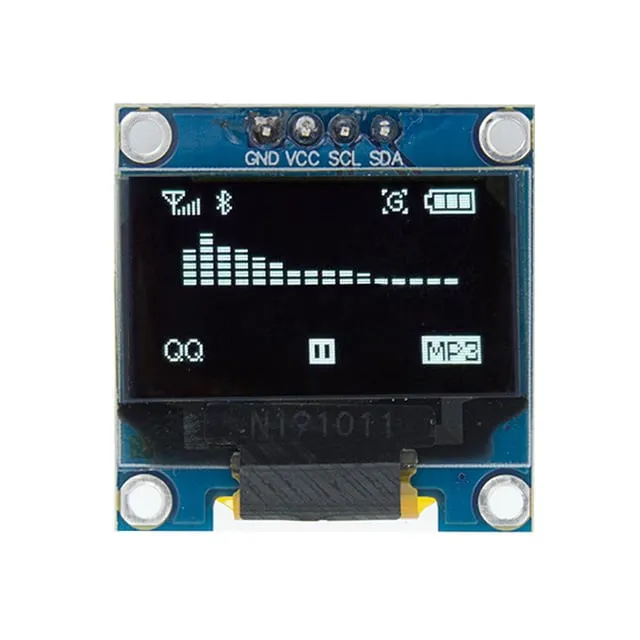
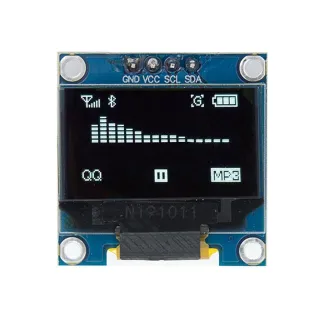
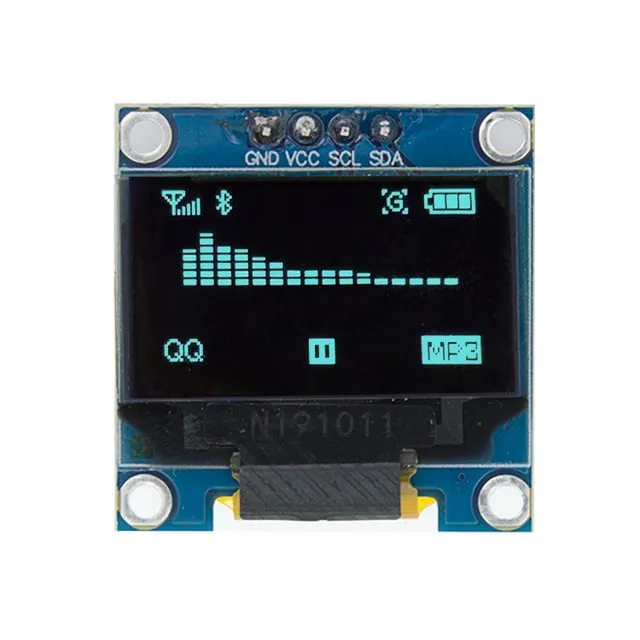
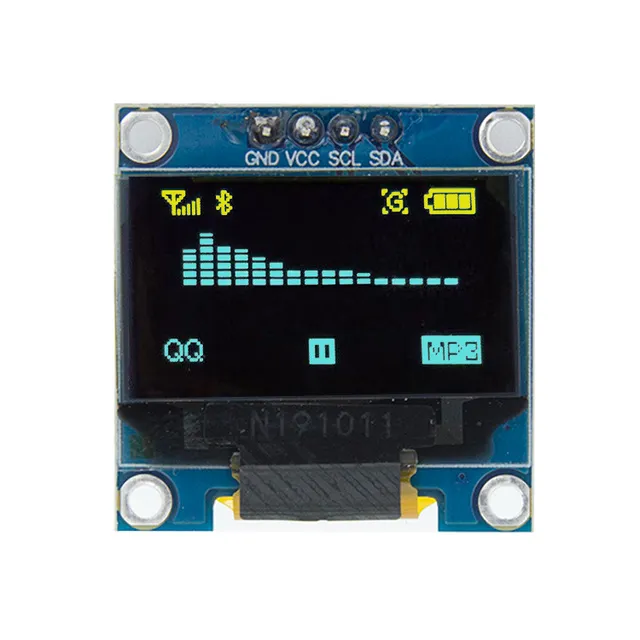
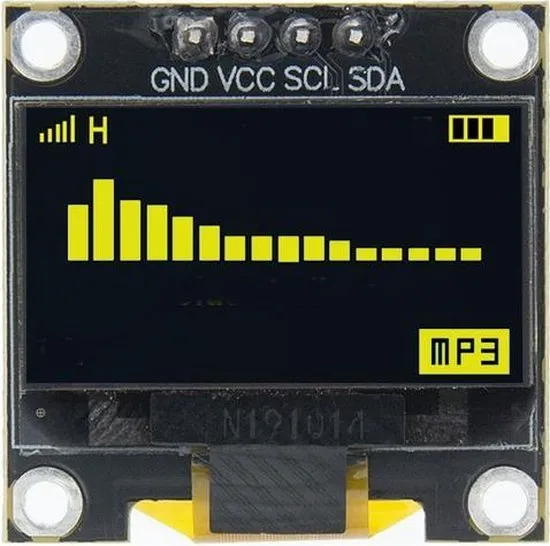
Mini OLED-display vit 0,96 tum 128x64 I2C

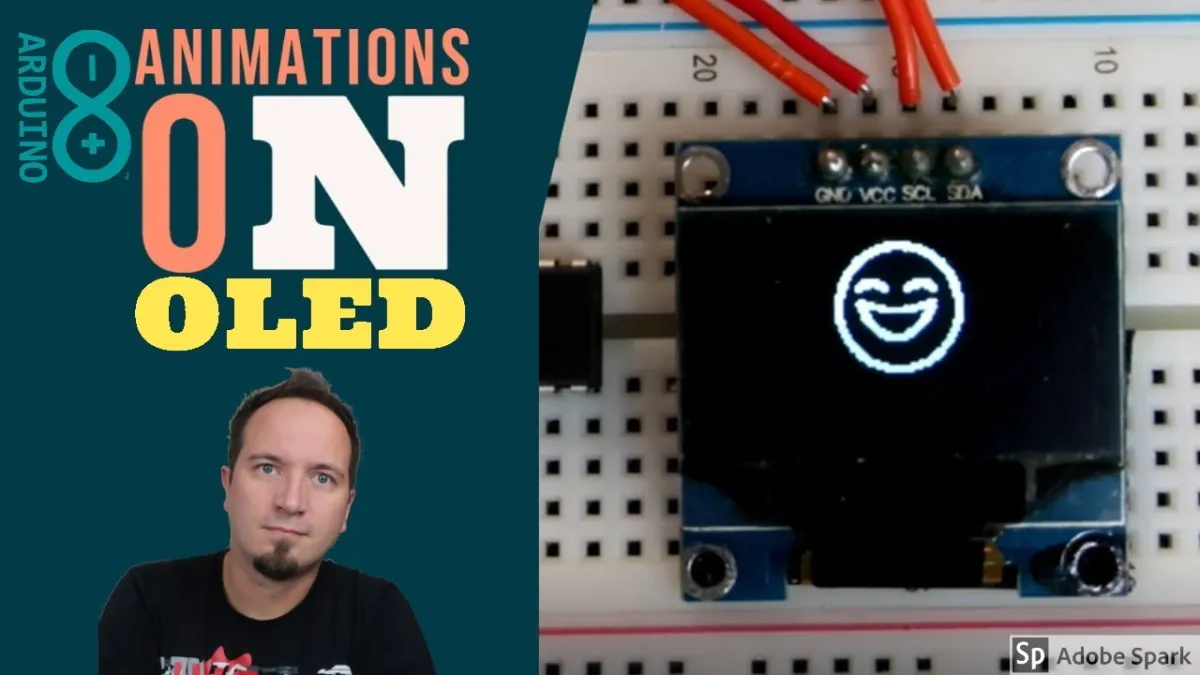
0,96 tum mini OLED-skärm. Knivskarp bild med en upplösning på 128x64 pixlar.

Fungerar med en matningsspänning på 3v-5v. Perfekt för Arduino- eller ESP32 / ESP8266-projekt.

Måtten på detta kort är endast 26,1 x 26,1 x 3,2mm.

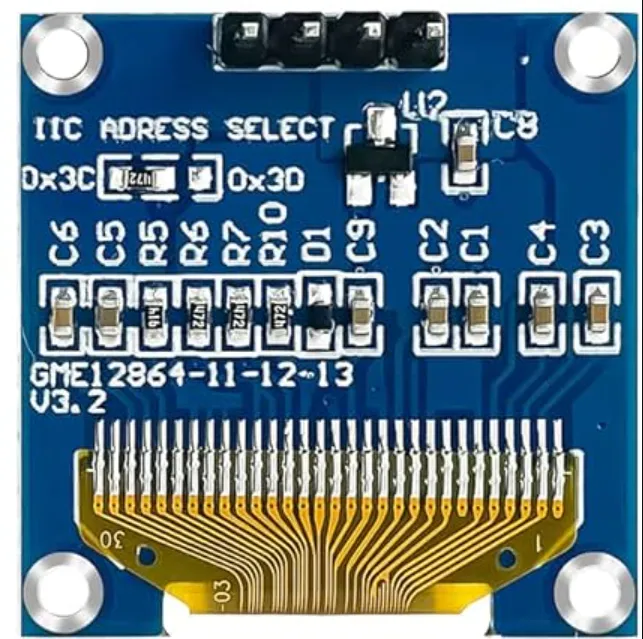
Det finns 2 i2c-adresser att välja mellan genom att ändra motståndet på baksidan.
Tillgängliga adresser är: 0x3C (default) och x3D

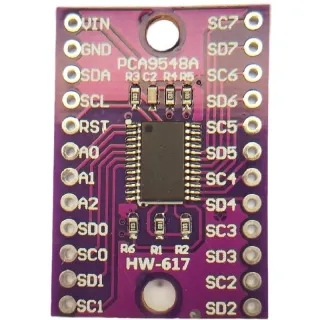
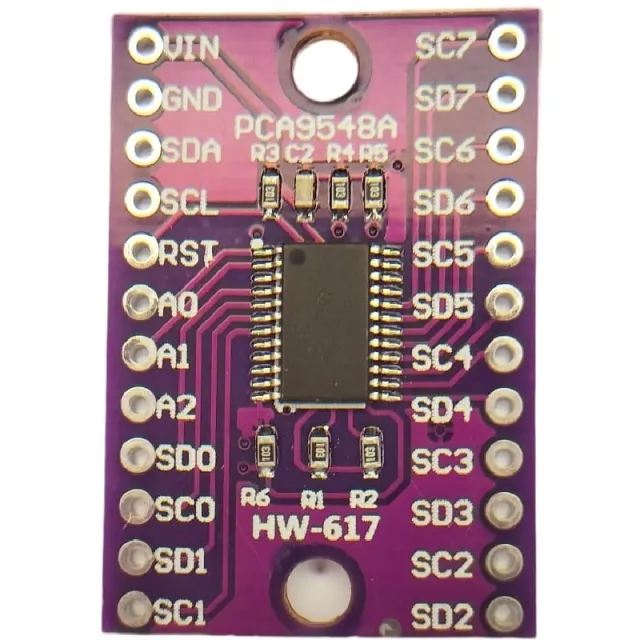
Om du vill styra flera OLED-displayer eller inte vill löda SMD-komponenterna kan du med en i2c mutliplexer också styra upp till 8x i2C-displayer med samma adress. 

se här kopplingsschemat och exempel-koden >>>

Mått
Längd: 2,61cm
Bredd: 2,61cm
Höjd: 0,32cm

  • 26,1 x 26,1 x 3,2 mm
  • 128x64 pixlar
  • 3v-5v strömförsörjning
  • I2C-adressval
Vid uppspelning laddas videon från YouTube.

Varför välja denna produkt?

  • Skarp bild – 128x64 pixlar för tydlig visning.
  • Lämplig för projekt – Perfekt för Arduino och ESP32/ESP8266.
  • Kompakt format – Kortet är endast 26,1 x 26,1 x 3,2 mm.
  • Två I2C-adresser – Välj 0x3C eller 0x3D.
  • Flera displayer – Med multiplexer upp till 8 displayer.
Specifikationer
Strömförsörjning3v-5v
Mått26,1 x 26,1 x 3,2 mm
Bredd2,61 cm
Upplösning128 x 64 pixlar
GränssnittI2C
Lämplig förArduino
Längd2,61 cm
Höjd0,32 cm
I2C-adress0x3C

Köps ofta tillsammans

Totalt: 127 kr

Recensioner

★★★★★ 4,9/5 10 recensioner
  • ★★★★★David Kapor

    ...........

  • ★★★★★Thomas IbrahimVerifierat köp

    Det var bra

  • ★★★★★Raymond GrégoireVerifierat köp

    Bra display!

Skriv ett omdöme
Ditt omdöme

Frakt & returer

Frakt

  • Paket med spårning85 kr5 arbetsdagar
  • Paket med spårning104 kr5 arbetsdagar
  • Paket med spårning124 kr5 arbetsdagar
  • Paket med spårning130 kr5 arbetsdagar
Allt om frakt

Returer

Inte nöjd? Du har 30 dagars ångerrätt efter leverans för att returnera produkten.

Allt om returer

Tidigare visade