SKU: OT2371-B13 Artikelnummer: NA330 EAN: 8321317104642

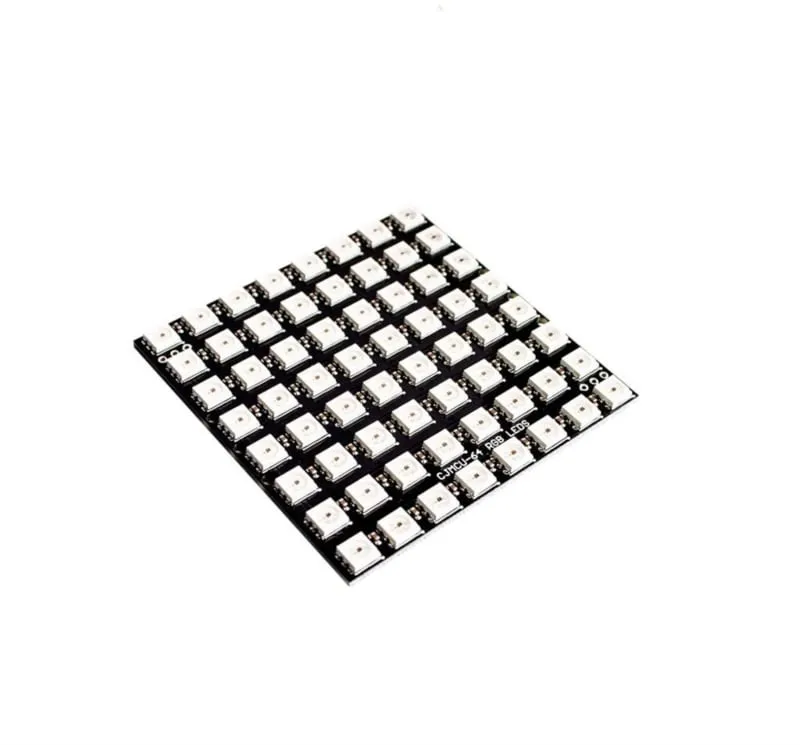
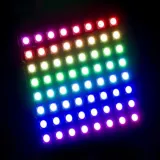
RGB LED-matris med 64 WS2812b adresserbara LEDs.
Fungerar på 5V och kan styras via Arduino, ESP8266 och ESP32.
Dimensioner
Längd: 6,5cm
Bredd: 6,5cm
Höjd: 0,3cm
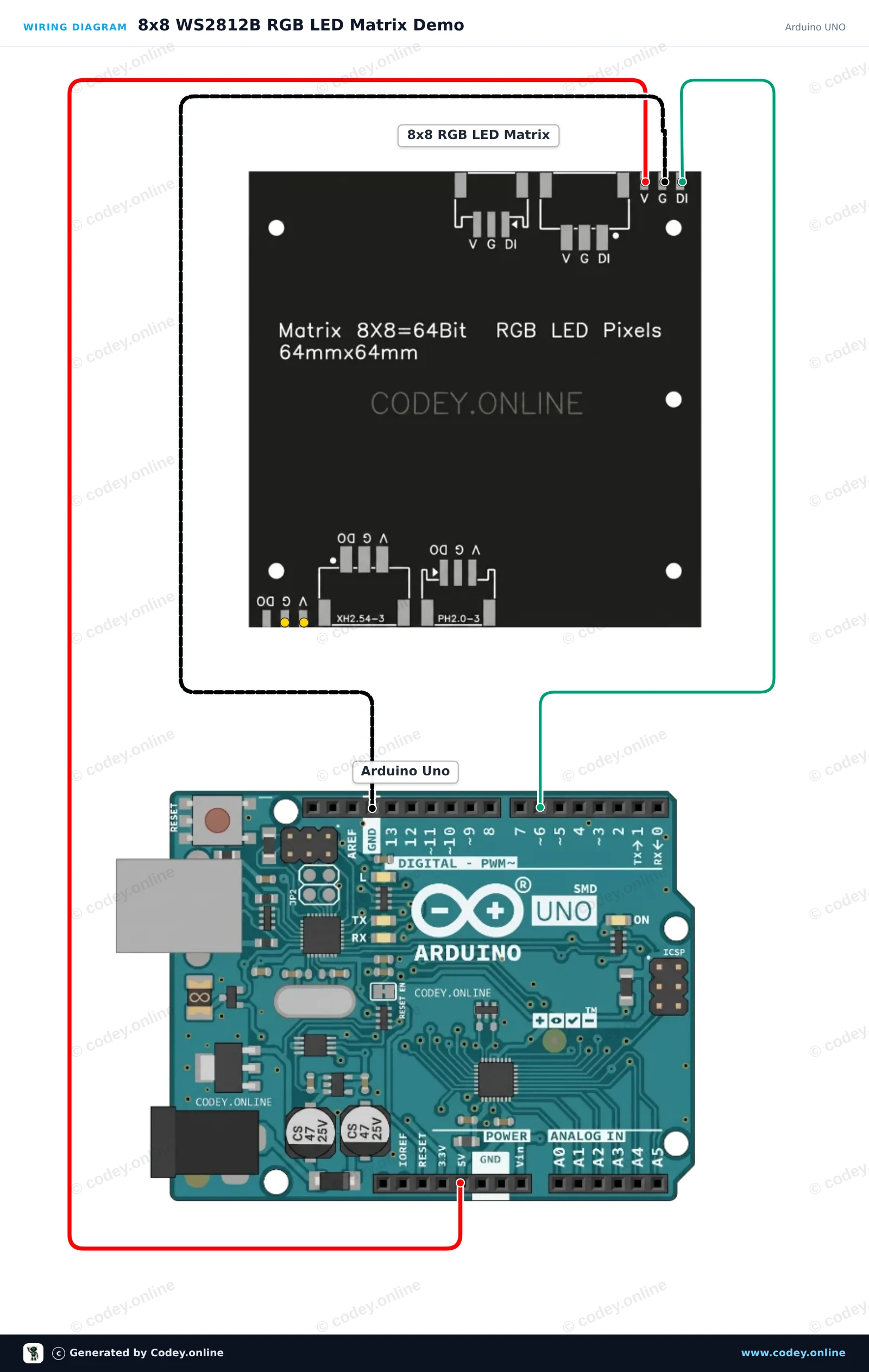
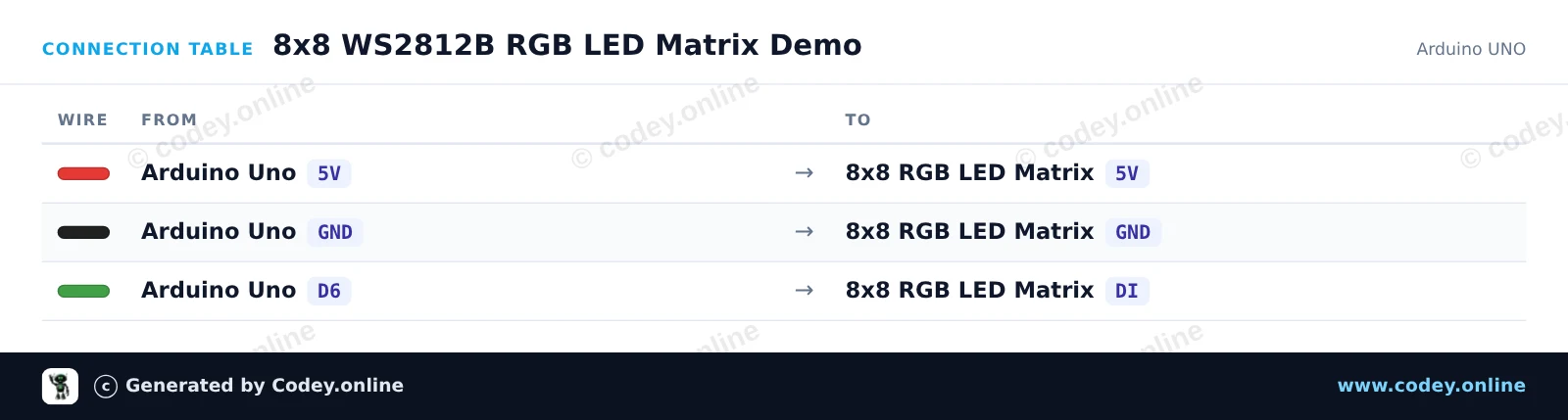
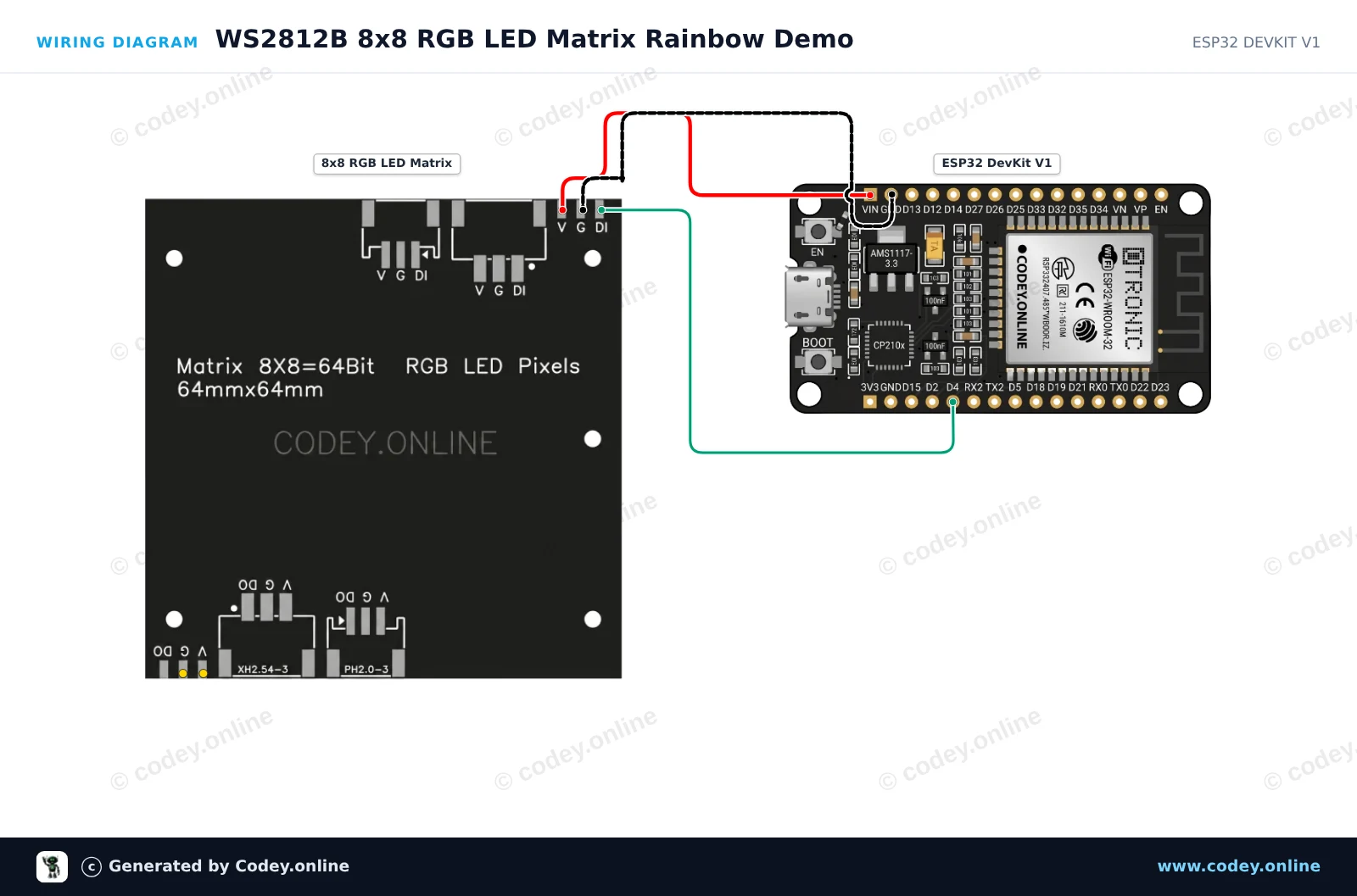
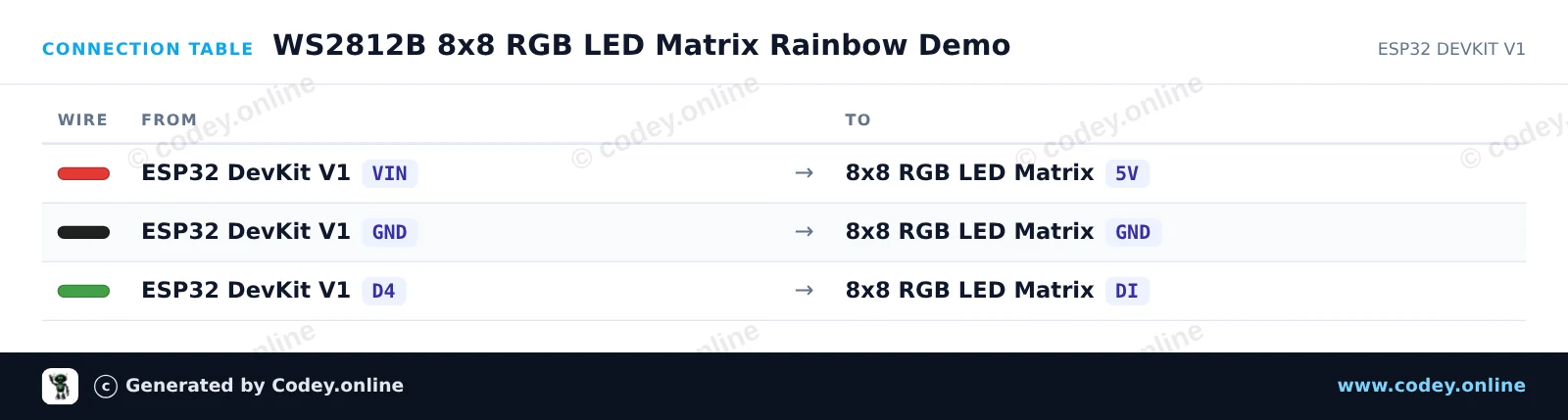
Så här kopplar du 8x8 RGB 64 LED-matris 5V WS2812b till en Arduino UNO eller ESP32, med ett exempelsketch som du kan ladda upp direkt.
This project demonstrates an 8x8 WS2812B addressable RGB LED matrix connected directly to an Arduino Uno. The sketch initializes the 64 LEDs and displays a rotating color pattern across the matrix at a safe brightness level. Connect the 5V, GND, and DI pins as shown to test your matrix in minutes.
/*
 * ==================================================================
 *  Generated by Codey.online  —  https://www.codey.online
 * ==================================================================
 *  Project   : 8x8 WS2812B RGB LED Matrix Demo
 *  Board     : Arduino UNO (arduino:avr:uno)
 *  Parts     : 8x8 RGB 64 LED Matrix 5V WS2812b
 *  Libraries : Adafruit NeoPixel 1.15.5
 *
 *  Codey Online is an AI-powered browser IDE for Arduino and ESP32.
 *  Describe your project and Codey writes the code, draws the wiring
 *  diagram and uploads it to your board, straight from the browser.
 *  This code is free to use, modify and share, without warranty.
 * ==================================================================
 */

#include <Adafruit_NeoPixel.h>

#define LED_PIN   6
#define LED_COUNT 64

Adafruit_NeoPixel matrix(LED_COUNT, LED_PIN, NEO_GRB + NEO_KHZ800);

// Converts (x, y) coordinates to pixel index (serpentine layout)
uint16_t getPixelIndex(uint8_t x, uint8_t y) {
  if (y % 2 == 0) {
    return y * 8 + x;
  } else {
    return y * 8 + (7 - x);
  }
}

void setup() {
  Serial.begin(115200);
  matrix.begin();
  matrix.setBrightness(30); // Keep brightness low when powered from Arduino 5V
  matrix.show();            // Turn off all pixels
  Serial.println(F("WS2812B 8x8 LED Matrix ready!"));
}

void loop() {
  static uint16_t hueOffset = 0;

  for (uint8_t y = 0; y < 8; y++) {
    for (uint8_t x = 0; x < 8; x++) {
      uint16_t pixelHue = hueOffset + ((x + y) * 65536L / 16);
      uint32_t color = matrix.gamma32(matrix.ColorHSV(pixelHue));
      matrix.setPixelColor(getPixelIndex(x, y), color);
    }
  }

  matrix.show();
  hueOffset += 500;
  delay(20);
}Nödvändiga bibliotek: Adafruit NeoPixel 1.15.5
Wiring diagram and example code generated by Codey.online — https://www.codey.online
This project drives an 8x8 WS2812B RGB LED matrix using an ESP32. It cycles colorful rainbow patterns across all 64 individual addressable LEDs. The brightness is set low to ensure safe operation directly via USB power.
/*
 * ==================================================================
 *  Generated by Codey.online  —  https://www.codey.online
 * ==================================================================
 *  Project   : WS2812B 8x8 RGB LED Matrix Rainbow Demo
 *  Board     : ESP32 DEVKIT V1 (esp32:esp32:esp32doit-devkit-v1)
 *  Parts     : 8x8 RGB 64 LED Matrix 5V WS2812b
 *  Libraries : Adafruit NeoPixel 1.15.5
 *
 *  Codey Online is an AI-powered browser IDE for Arduino and ESP32.
 *  Describe your project and Codey writes the code, draws the wiring
 *  diagram and uploads it to your board, straight from the browser.
 *  This code is free to use, modify and share, without warranty.
 * ==================================================================
 */

#include <Adafruit_NeoPixel.h>

#define LED_PIN    4
#define LED_COUNT  64
#define BRIGHTNESS 30

Adafruit_NeoPixel matrix(LED_COUNT, LED_PIN, NEO_GRB + NEO_KHZ800);

void setup() {
  Serial.begin(115200);
  matrix.begin();
  matrix.setBrightness(BRIGHTNESS);
  matrix.show();
  Serial.println("WS2812B 8x8 Matrix Initialized");
}

void loop() {
  // Rainbow cycle across the matrix
  for (long firstPixelHue = 0; firstPixelHue < 5 * 65536; firstPixelHue += 256) {
    for (int i = 0; i < matrix.numPixels(); i++) {
      int pixelHue = firstPixelHue + (i * 65536L / matrix.numPixels());
      matrix.setPixelColor(i, matrix.gamma32(matrix.ColorHSV(pixelHue)));
    }
    matrix.show();
    delay(15);
  }
}Nödvändiga bibliotek: Adafruit NeoPixel 1.15.5
Wiring diagram and example code generated by Codey.online — https://www.codey.online






 English
  Nederlands
  Frans
Frans  Deutsch
  Italiano
  Español
  Suomi
Suomi  Polski
  Dansk
Dansk  Ελληνικά
  Български
  Čeština
  Hrvatski
  Aileen