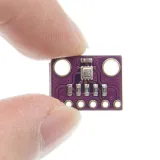
SKU: OT711-D64 Artikelnummer: NB078 EAN: 4184669585804

OBS 3.3V-version. Lämplig för ESP8266, ESP32, Wemos D1 etc.
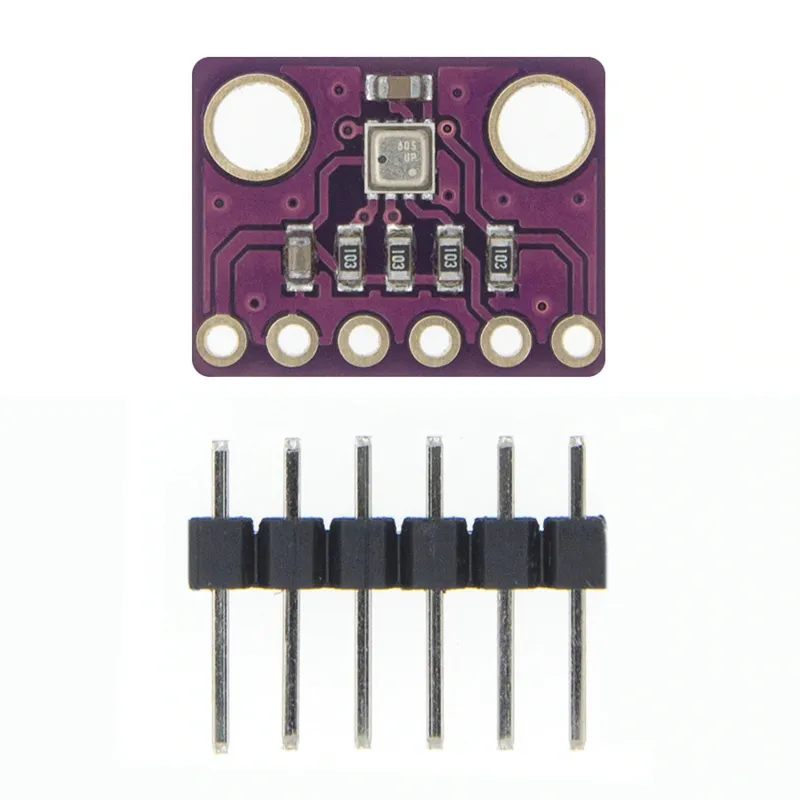
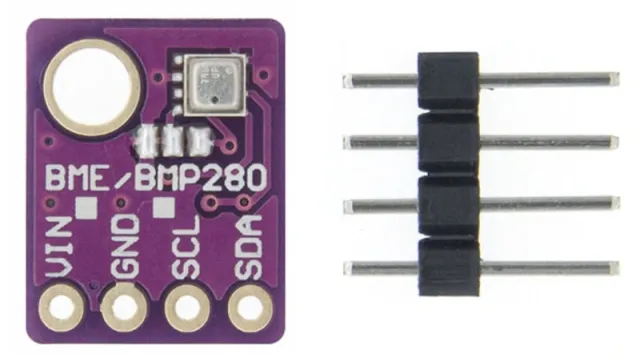
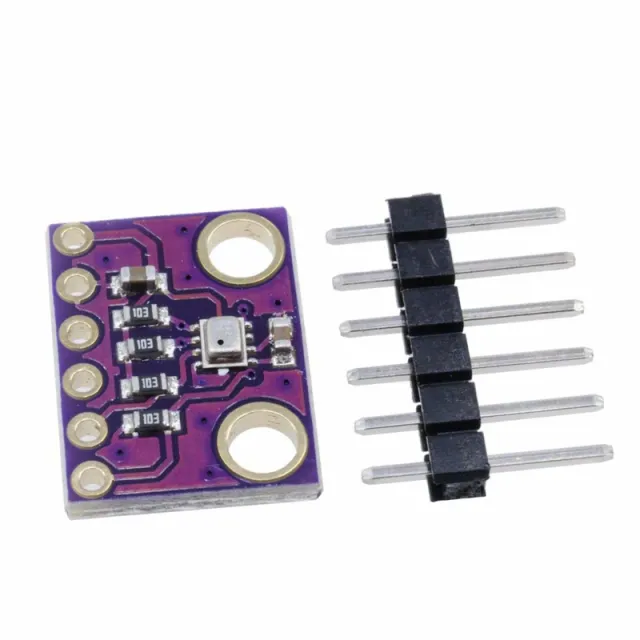
GY-BME280 är ett breakout board med en Bosch Sensortec ME280 temperatur-, luftfuktighets- och lufttryckssensor.
Kortet har en valbar I2C-adress (lödjumper GS2)
- I2C pull-up-motstånd
- Inkluderar 7-pin header 2.54mm
- två monteringshål på 3.5mm.
BME280 Egenskaper
- Sensormärke: Bosch
- Sensorstorlek 2.5mm x 2.5mm x 0.93mm metallock LGA
- Digital gränssnitt I2C (upp till 3.4 MHz) och SPI (3- och 4-tråds, upp till 10 MHz)
- Matningsspänning: 3V till 3.6 V
- Strömförbrukning 1.8 uA @ 1Hz luftfuktighet och temperatur, 2.8 uA @ 1Hz tryck och temperatur. 3.6 uA @ 1Hz luftfuktighet, tryck och temperatur och 0.1 uA i viloläge
- Område för temperatursensor -40 / +85 C,
- Område för luftfuktighet; 0 - 100% rel. Luftfuktighet
- Område för lufttryck: 300- 1100 hPa
- Både I2C och SPI
Mått
Längd: 1,47cm
Bredd: 1,14cm
Höjd: 0,23cm
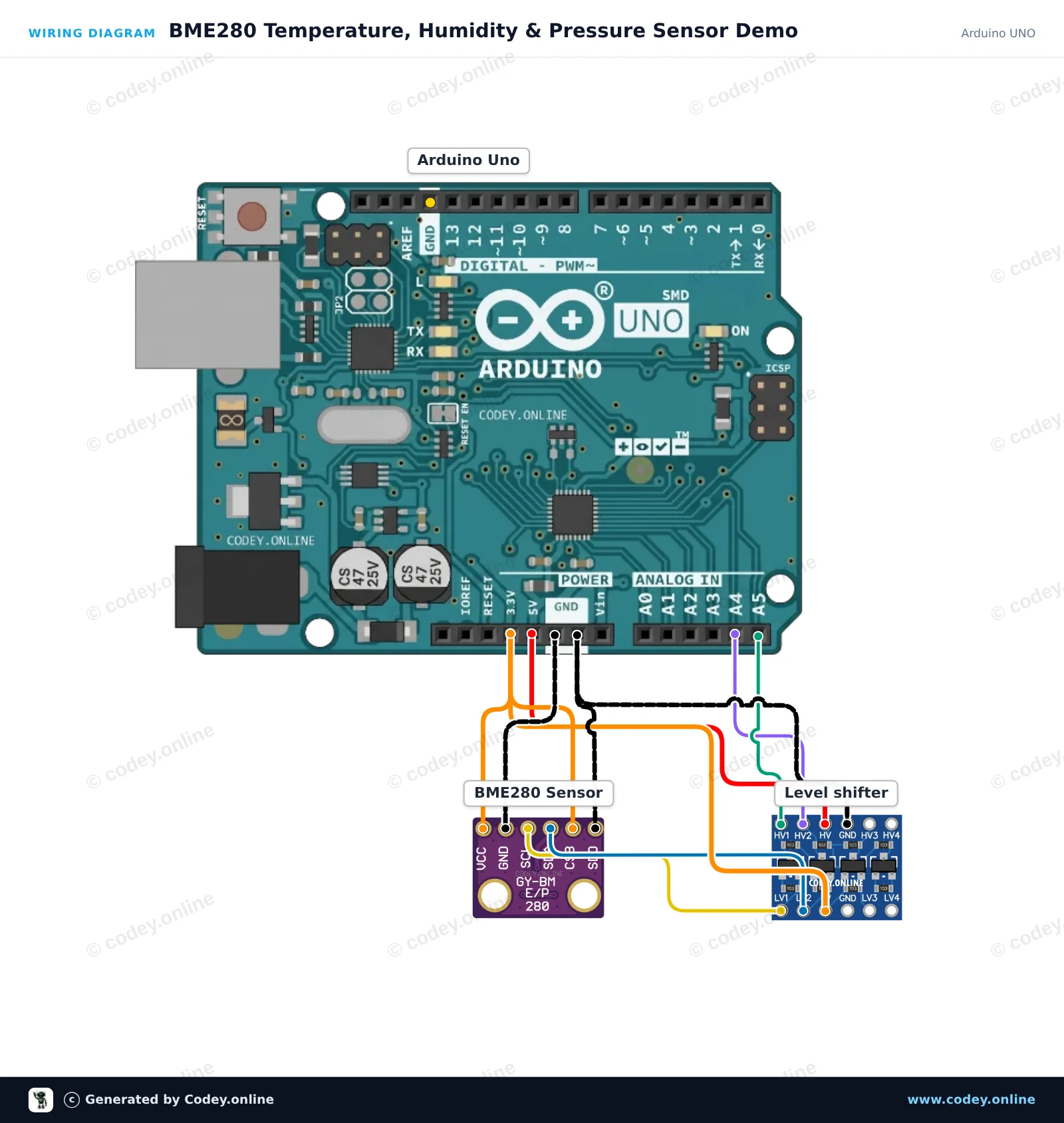
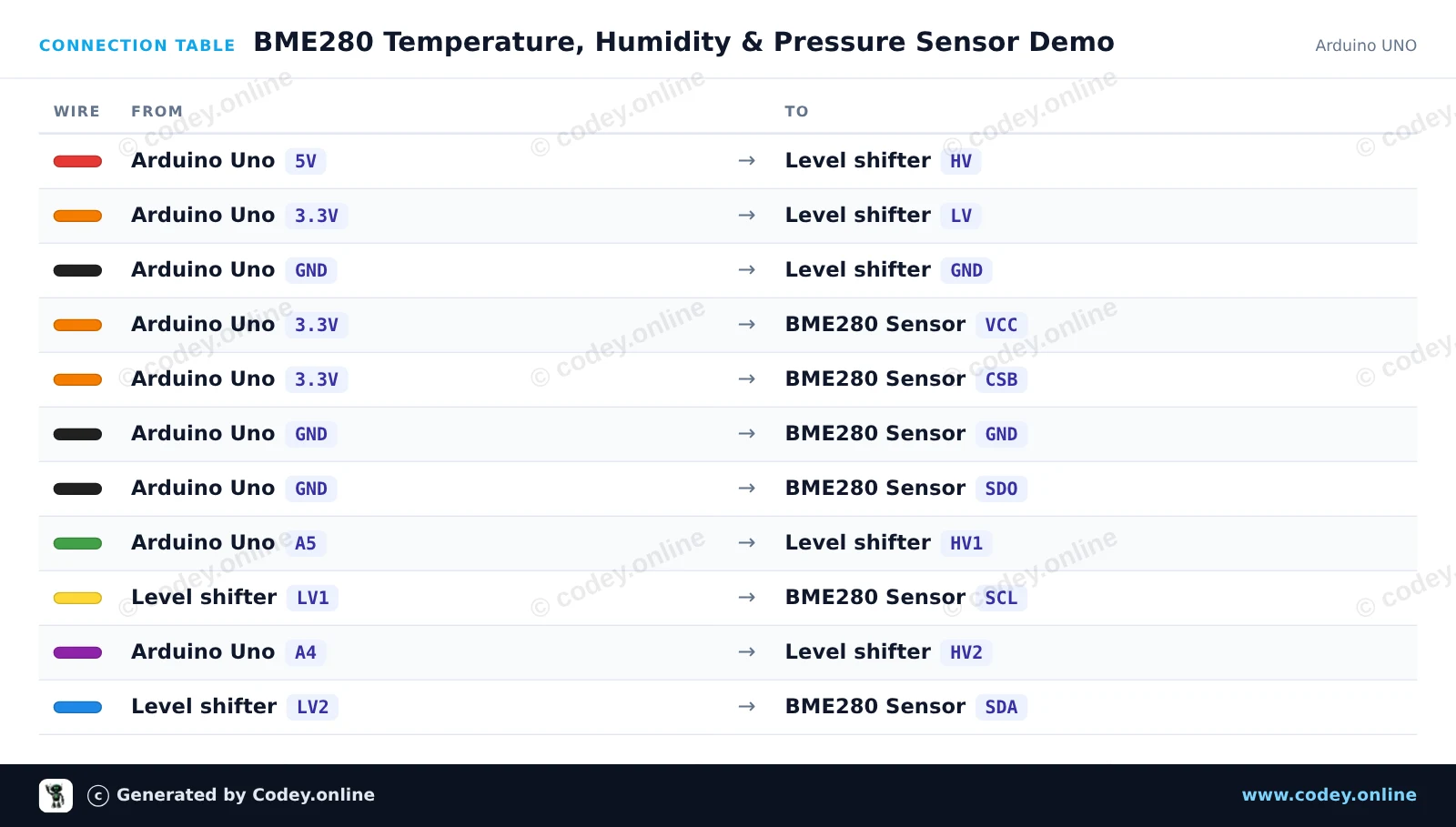
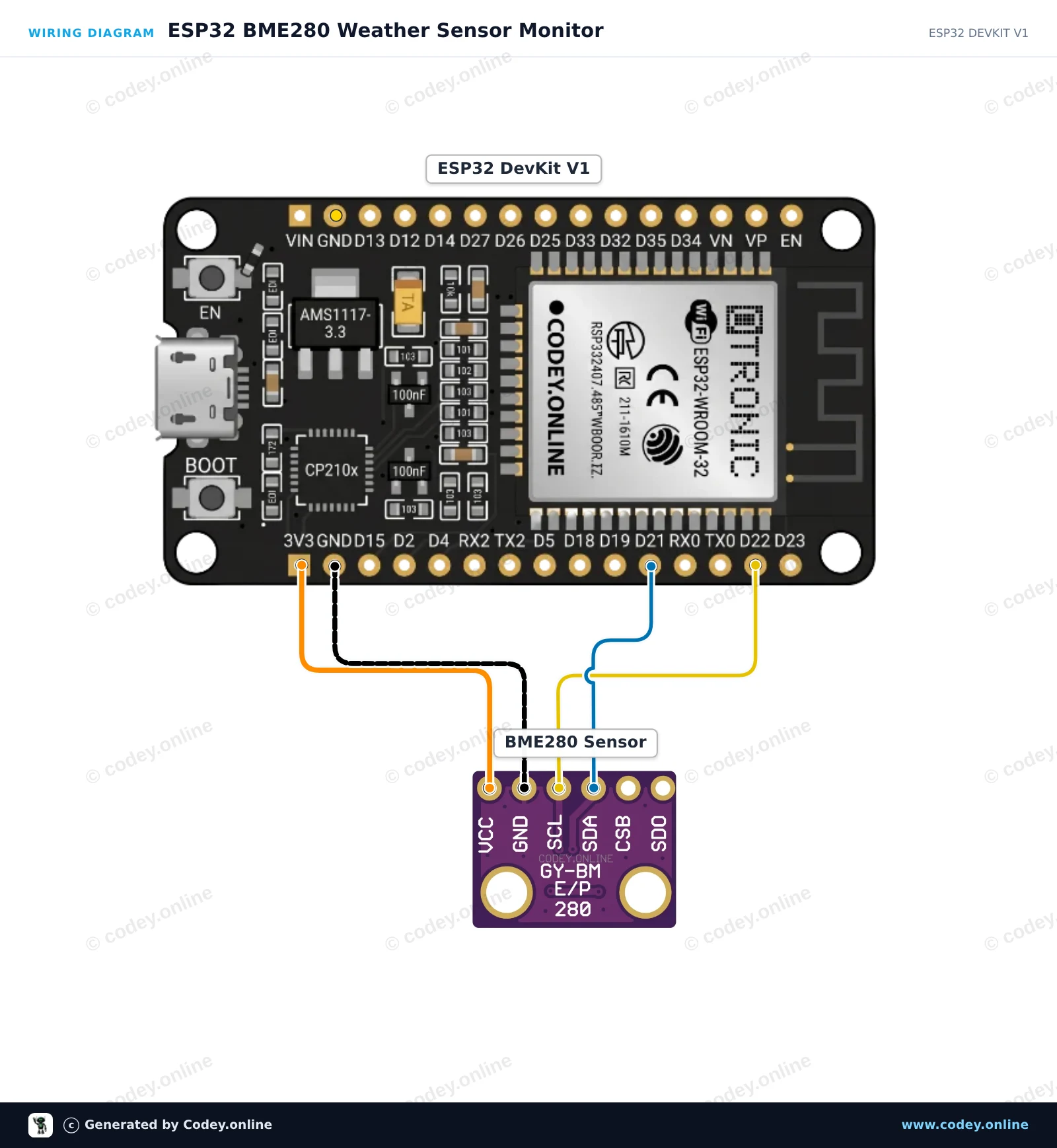
Så här kopplar du 3-i-1 sensor Temperatur Luftfuktighet och Lufttryck | 3.3V | I2C och SPI | Bosch BME280 till en Arduino UNO eller ESP32, med ett exempelsketch som du kan ladda upp direkt.
This project reads ambient temperature, relative humidity, and atmospheric pressure using a 3.3V BME280 sensor connected to an Arduino Uno. A 4-channel bidirectional logic level shifter safely translates the 5V I2C signals down to 3.3V. Sensor readings are output to the Serial Monitor every two seconds.
/*
 * ==================================================================
 *  Generated by Codey.online  —  https://www.codey.online
 * ==================================================================
 *  Project   : BME280 Temperature, Humidity & Pressure Sensor Demo
 *  Board     : Arduino UNO (arduino:avr:uno)
 *  Parts     : Bosch BME280 3.3v 3-in-1 sensor Temperature Humidity and Air Pressure
 *  Libraries : Adafruit BME280 Library 2.3.0, Adafruit Unified Sensor 1.1.15
 *
 *  Codey Online is an AI-powered browser IDE for Arduino and ESP32.
 *  Describe your project and Codey writes the code, draws the wiring
 *  diagram and uploads it to your board, straight from the browser.
 *  This code is free to use, modify and share, without warranty.
 * ==================================================================
 */

#include <Wire.h>
#include <Adafruit_Sensor.h>
#include <Adafruit_BME280.h>

Adafruit_BME280 bme;

void setup() {
  Serial.begin(115200);
  while (!Serial) delay(10);

  Serial.println(F("Initializing BME280 sensor..."));

  // SDO tied to GND sets address to 0x76
  if (!bme.begin(0x76, &Wire)) {
    Serial.println(F("Could not find BME280 sensor. Check wiring!"));
    while (1) delay(100);
  }

  Serial.println(F("BME280 sensor ready!"));
}

void loop() {
  float temperature = bme.readTemperature();
  float humidity = bme.readHumidity();
  float pressure = bme.readPressure() / 100.0F; // Convert Pa to hPa

  Serial.print(F("Temperature: "));
  Serial.print(temperature, 1);
  Serial.print(F(" °C | Humidity: "));
  Serial.print(humidity, 1);
  Serial.print(F(" % | Pressure: "));
  Serial.print(pressure, 1);
  Serial.println(F(" hPa"));

  delay(2000);
}Nödvändiga bibliotek: Adafruit BME280 Library 2.3.0, Adafruit Unified Sensor 1.1.15
Wiring diagram and example code generated by Codey.online — https://www.codey.online
This project reads ambient temperature, relative humidity, and barometric pressure from the Bosch BME280 sensor using the I2C interface. Connect the 3.3V sensor directly to the ESP32 power and default I2C pins (GPIO 21 and 22). Open the Serial Monitor at 115200 baud to view real-time environmental measurements updated every two seconds.
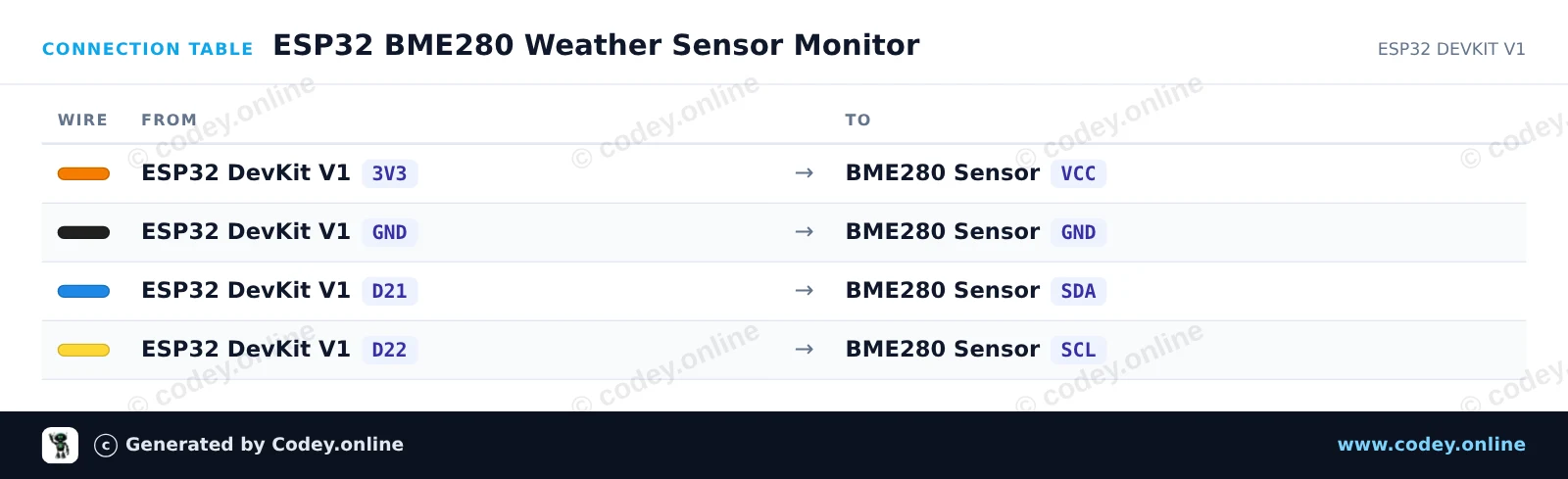
/*
 * ==================================================================
 *  Generated by Codey.online  —  https://www.codey.online
 * ==================================================================
 *  Project   : ESP32 BME280 Weather Sensor Monitor
 *  Board     : ESP32 DEVKIT V1 (esp32:esp32:esp32doit-devkit-v1)
 *  Parts     : Bosch BME280 3.3v 3-in-1 sensor Temperature Humidity and Air Pressure
 *  Libraries : Adafruit BME280 Library 2.3.0, Adafruit Unified Sensor 1.1.15
 *
 *  Codey Online is an AI-powered browser IDE for Arduino and ESP32.
 *  Describe your project and Codey writes the code, draws the wiring
 *  diagram and uploads it to your board, straight from the browser.
 *  This code is free to use, modify and share, without warranty.
 * ==================================================================
 */

#include <Wire.h>
#include <Adafruit_Sensor.h>
#include <Adafruit_BME280.h>

Adafruit_BME280 bme;

void setup() {
  Serial.begin(115200);
  while (!Serial) delay(10);

  Serial.println("Initializing BME280 sensor...");

  // Default I2C address is usually 0x76 or 0x77
  if (!bme.begin(0x76) && !bme.begin(0x77)) {
    Serial.println("Could not find a valid BME280 sensor! Check wiring.");
    while (1) delay(100);
  }

  Serial.println("BME280 initialized successfully.");
}

void loop() {
  float temperature = bme.readTemperature();
  float humidity = bme.readHumidity();
  float pressure = bme.readPressure() / 100.0F; // Convert Pa to hPa

  Serial.print("Temperature: ");
  Serial.print(temperature);
  Serial.println(" °C");

  Serial.print("Humidity:    ");
  Serial.print(humidity);
  Serial.println(" %");

  Serial.print("Pressure:    ");
  Serial.print(pressure);
  Serial.println(" hPa");

  Serial.println("------------------------");
  delay(2000);
}Nödvändiga bibliotek: Adafruit BME280 Library 2.3.0, Adafruit Unified Sensor 1.1.15
Wiring diagram and example code generated by Codey.online — https://www.codey.online





 English
  Nederlands
  Frans
Frans  Deutsch
  Italiano
  Español
  Suomi
Suomi  Polski
  Dansk
Dansk  Ελληνικά
  Български
  Čeština
  Hrvatski
  Aileen