SKU: OT760-D37 Artikelnummer: AA115 EAN: 8720589817258

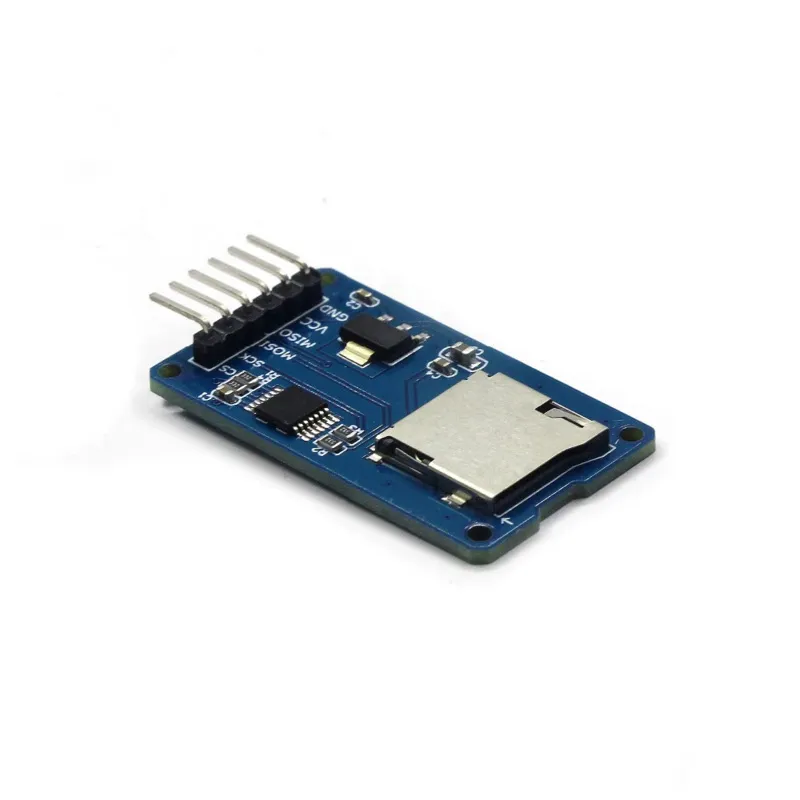
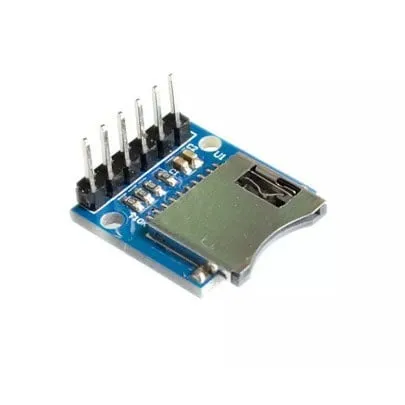
Denna micro SD-kortläsare är lämplig för Arudino, ESP8266, ESP32, Wemos etc. Är redan en del av standardbiblioteket för Arduino.
Idealisk för att läsa och skriva filer. Lagringskapaciteten bestäms av det micro SD-kort som sätts i.
Korttyp: Micro SD upp till max. 2GB och Micro SDHC upp till max 32GB
Kretsström: 3.3V och 5V
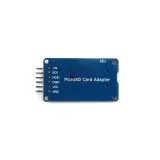
Anslutningar: VCC, GND, MISO, MOSI, SCK/SPI och CS
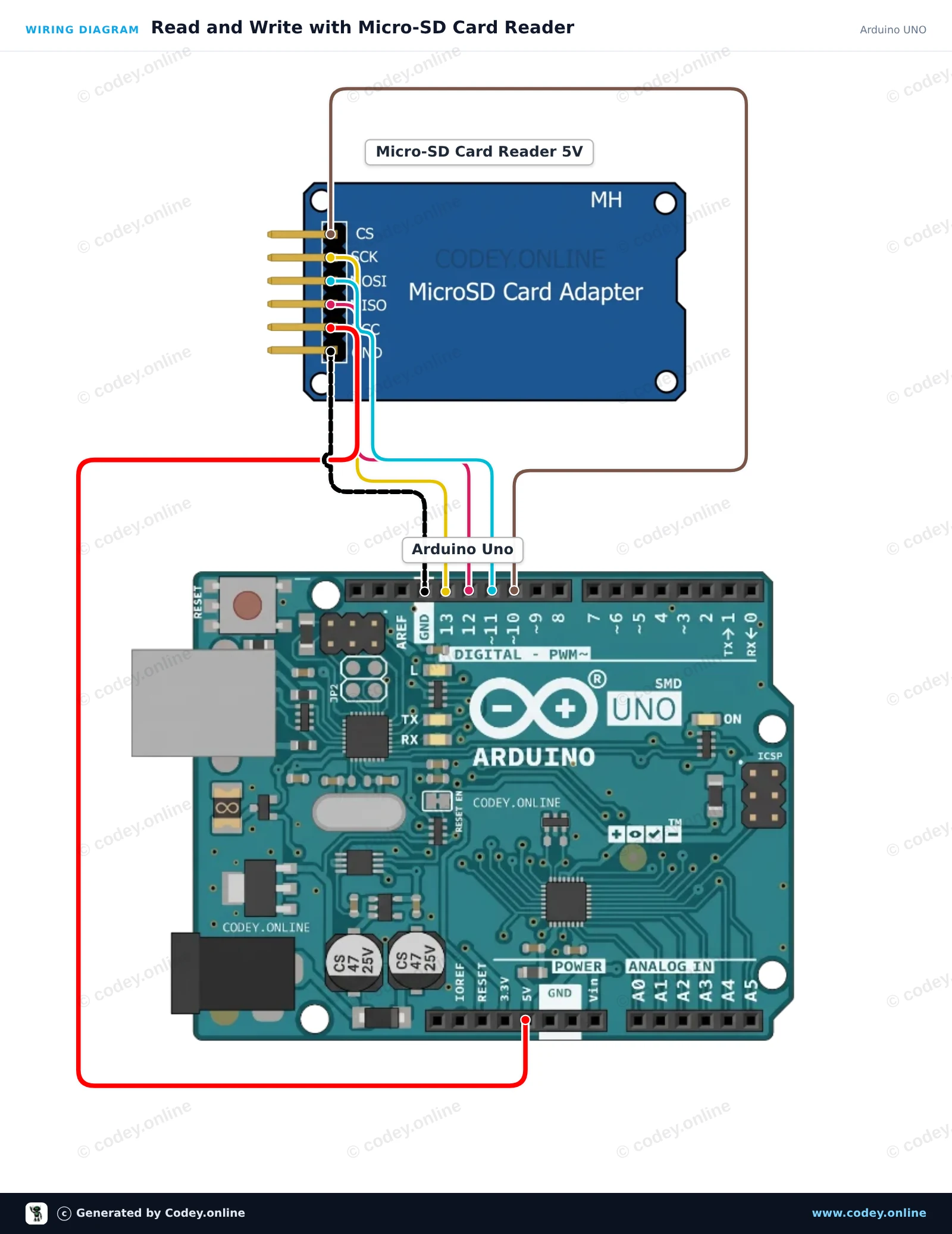
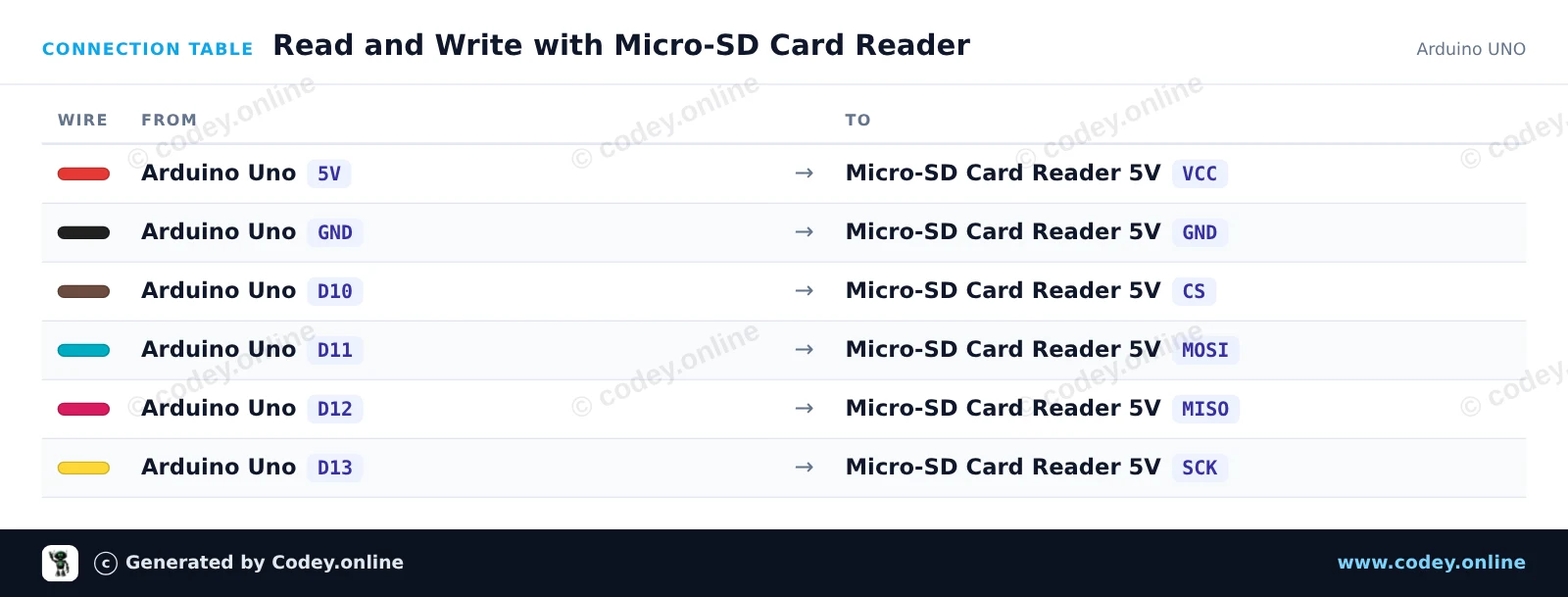
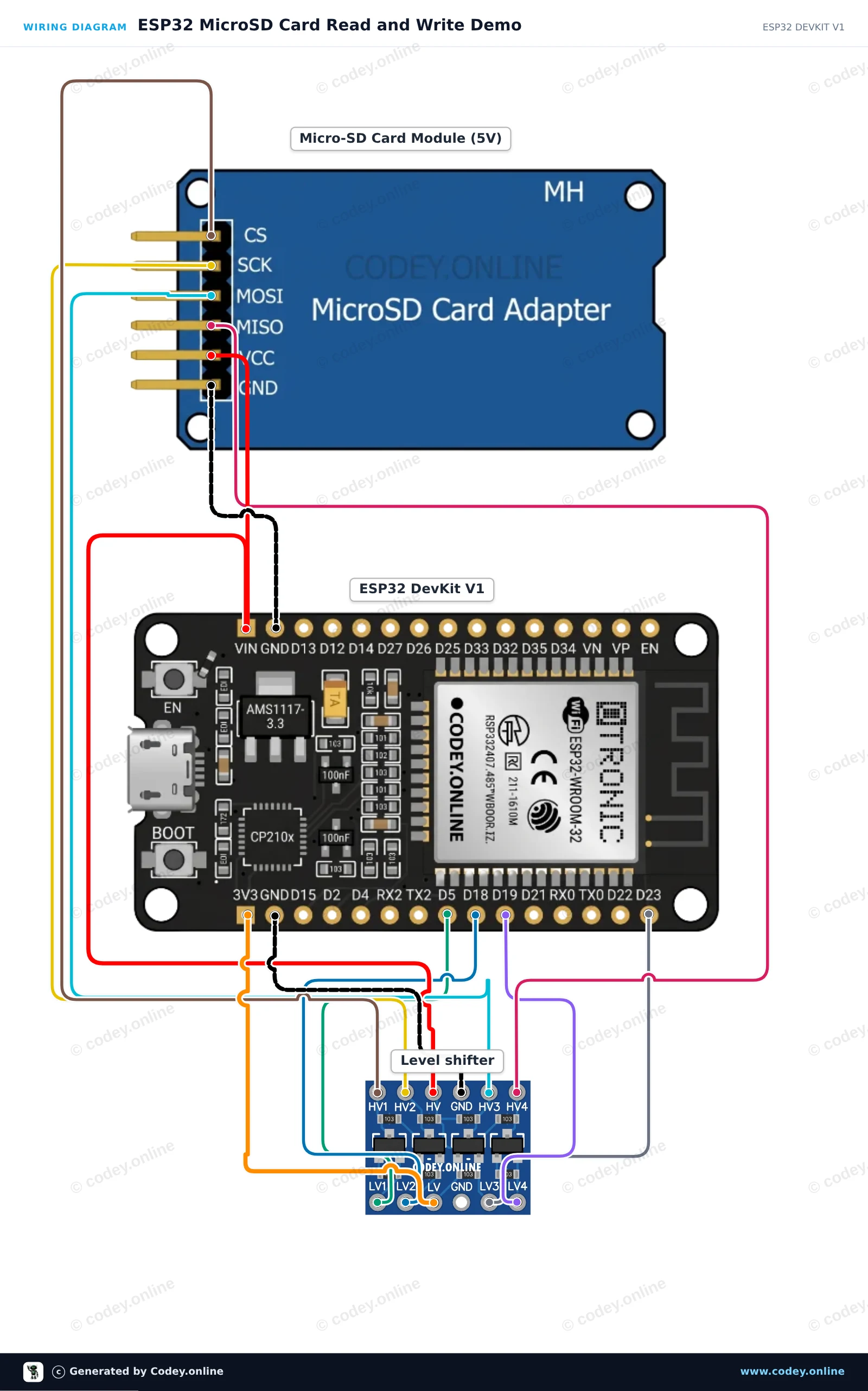
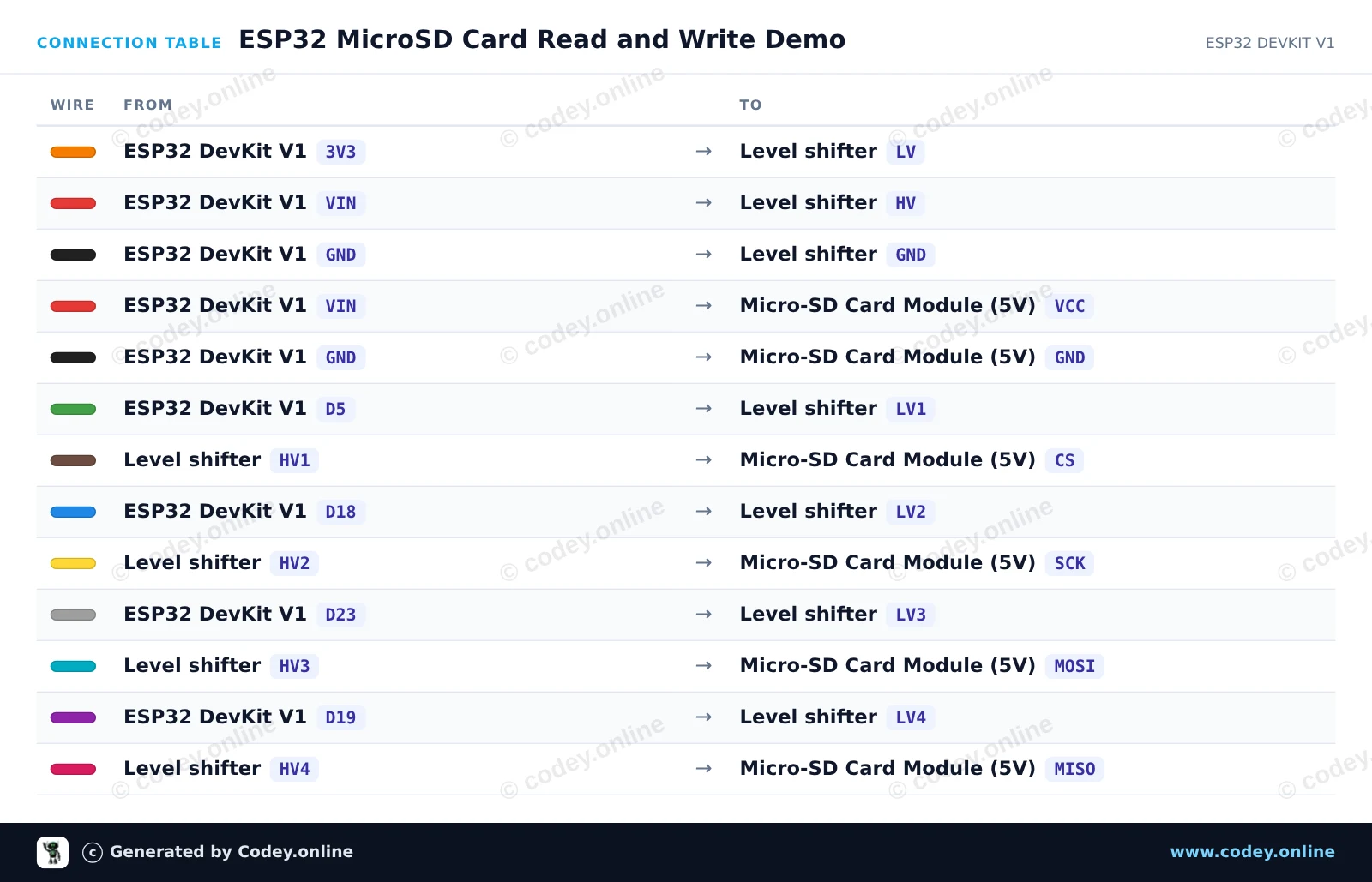
Så här kopplar du Micro SD Kortläsare för Arduino till en Arduino UNO eller ESP32, med ett exempelsketch som du kan ladda upp direkt.
This project demonstrates how to connect a 5V Micro-SD card reader to an Arduino Uno using SPI communication. The sketch initializes the SD card, writes a line of text to a file named test.txt, and reads the file back to the Serial Monitor. Open the Serial Monitor at 115200 baud to view the output.
/*
 * ==================================================================
 *  Generated by Codey.online  —  https://www.codey.online
 * ==================================================================
 *  Project   : Read and Write with Micro-SD Card Reader
 *  Board     : Arduino UNO (arduino:avr:uno)
 *  Parts     : Micro-SD Card Reader 5V
 *  Libraries : none (built-in)
 *
 *  Codey Online is an AI-powered browser IDE for Arduino and ESP32.
 *  Describe your project and Codey writes the code, draws the wiring
 *  diagram and uploads it to your board, straight from the browser.
 *  This code is free to use, modify and share, without warranty.
 * ==================================================================
 */

#include <SPI.h>
#include <SD.h>

const int chipSelect = 10;

void setup() {
  Serial.begin(115200);
  while (!Serial) {
    ; // Wait for serial port to connect
  }

  Serial.println(F("Initializing SD card..."));

  if (!SD.begin(chipSelect)) {
    Serial.println(F("Initialization failed! Check wiring and FAT16/FAT32 format."));
    return;
  }
  Serial.println(F("Initialization done."));

  // Write data to the card
  File myFile = SD.open("test.txt", FILE_WRITE);
  if (myFile) {
    Serial.print(F("Writing to test.txt..."));
    myFile.println(F("Hello from Arduino UNO!"));
    myFile.close();
    Serial.println(F(" done."));
  } else {
    Serial.println(F("Error opening test.txt for writing."));
  }

  // Read data back from the card
  myFile = SD.open("test.txt");
  if (myFile) {
    Serial.println(F("--- Content of test.txt ---"));
    while (myFile.available()) {
      Serial.write(myFile.read());
    }
    myFile.close();
    Serial.println(F("--- End of file ---"));
  } else {
    Serial.println(F("Error opening test.txt for reading."));
  }
}

void loop() {
  // Demo runs once in setup
}Wiring diagram and example code generated by Codey.online — https://www.codey.online
Connect the 5V MicroSD card module to the ESP32 using a 4-channel logic level shifter to ensure safe 3.3V SPI communication. The sketch initializes the SD card on the VSPI bus, creates and writes a test file, and reads its contents back over the Serial Monitor at 115200 baud.
/*
 * ==================================================================
 *  Generated by Codey.online  —  https://www.codey.online
 * ==================================================================
 *  Project   : ESP32 MicroSD Card Read and Write Demo
 *  Board     : ESP32 DEVKIT V1 (esp32:esp32:esp32doit-devkit-v1)
 *  Parts     : Micro-SD Card Reader 5V
 *  Libraries : none (built-in)
 *
 *  Codey Online is an AI-powered browser IDE for Arduino and ESP32.
 *  Describe your project and Codey writes the code, draws the wiring
 *  diagram and uploads it to your board, straight from the browser.
 *  This code is free to use, modify and share, without warranty.
 * ==================================================================
 */

#include "FS.h"
#include "SD.h"
#include "SPI.h"

const int chipSelect = 5;

void setup() {
  Serial.begin(115200);
  while (!Serial) { delay(10); }

  Serial.println("Initializing SD card...");

  if (!SD.begin(chipSelect)) {
    Serial.println("Card Mount Failed! Check wiring and ensure a FAT32 card is inserted.");
    return;
  }

  uint8_t cardType = SD.cardType();
  if (cardType == CARD_NONE) {
    Serial.println("No SD card attached.");
    return;
  }

  Serial.print("SD Card Type: ");
  if (cardType == CARD_MMC) Serial.println("MMC");
  else if (cardType == CARD_SD) Serial.println("SDSC");
  else if (cardType == CARD_SDHC) Serial.println("SDHC");
  else Serial.println("UNKNOWN");

  uint64_t cardSize = SD.cardSize() / (1024 * 1024);
  Serial.printf("SD Card Size: %lluMB\n", cardSize);

  // Write to a test file
  Serial.println("Writing to test.txt...");
  File file = SD.open("/test.txt", FILE_WRITE);
  if (file) {
    file.println("Hello from ESP32 and MicroSD Card!");
    file.close();
    Serial.println("Write complete.");
  } else {
    Serial.println("Error opening file for writing.");
  }

  // Read the test file back
  Serial.println("Reading test.txt:");
  file = SD.open("/test.txt");
  if (file) {
    while (file.available()) {
      Serial.write(file.read());
    }
    file.close();
  } else {
    Serial.println("Error opening file for reading.");
  }
}

void loop() {
  // Idle
}Wiring diagram and example code generated by Codey.online — https://www.codey.online





 English
  Nederlands
  Frans
Frans  Deutsch
  Italiano
  Español
  Suomi
Suomi  Polski
  Dansk
Dansk  Ελληνικά
  Български
  Čeština
  Hrvatski
  Aileen