SKU: OT8822 Artikelnummer: NA061 EAN: 8720828223482

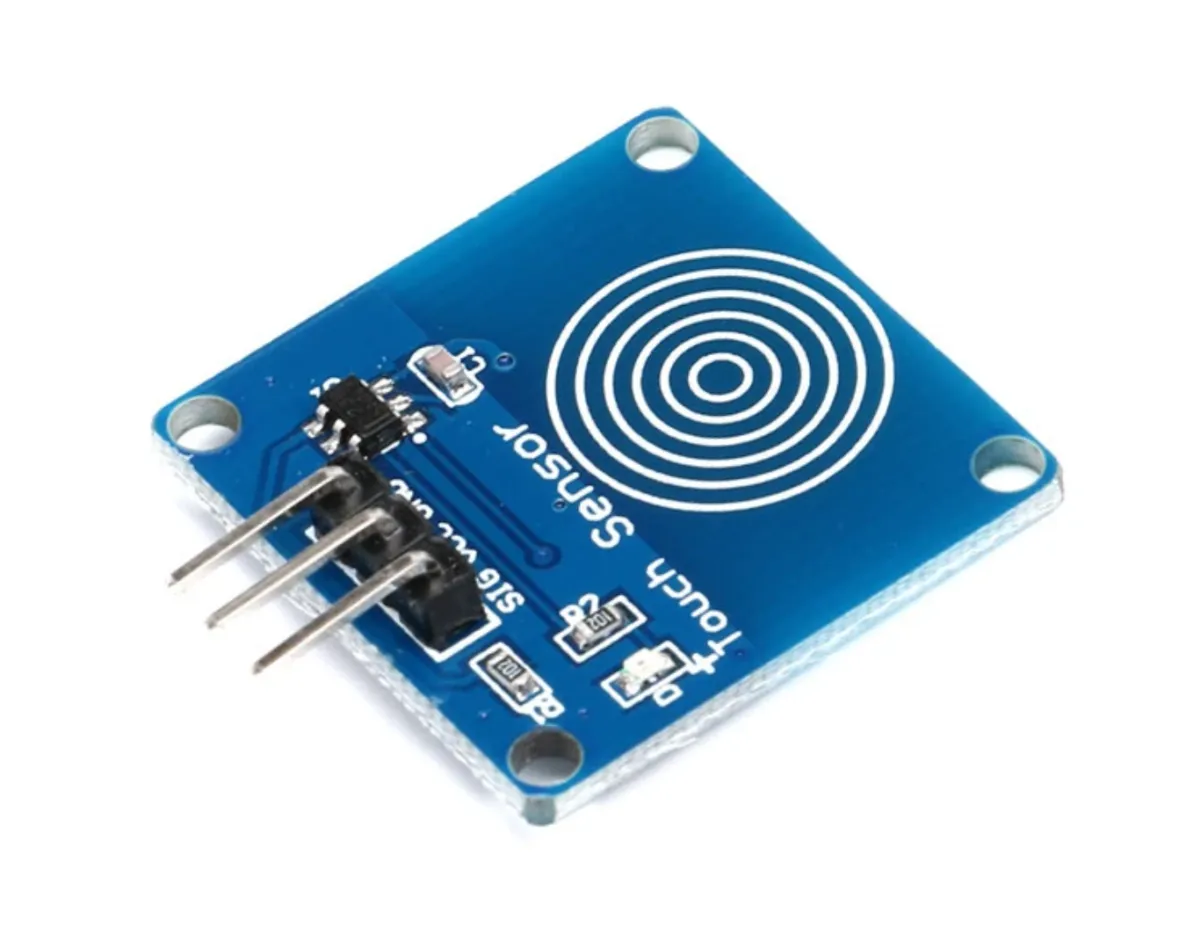
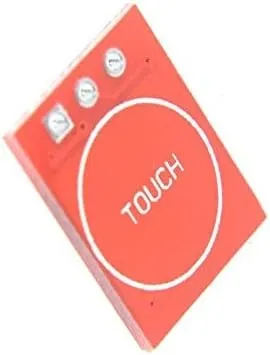
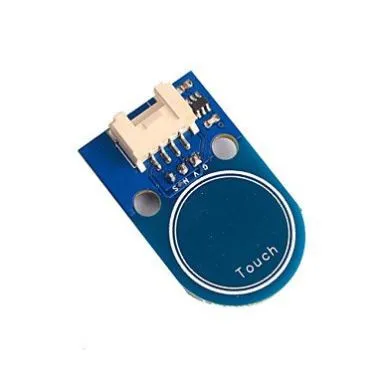
TTP223B är en kapacitiv touchsensor som reagerar på beröring av ett objekt eller en person på en känslig yta. Denna sensor är utformad för olika tillämpningar, såsom pekstyrning, pekbrytare och -knappar, samt andra touchaktiverade enheter.
Tekniska specifikationer TTP223B Touchsensor:
TTP223B-touchsensorn har en inbyggd debounce-krets för att förhindra störningar. Strömförbrukningen är låg, mindre än 1 mA i standby-läge. Sensorn har en snabb respons på mindre än 60 ms och en lång livslängd på mer än 100.000 cykler.
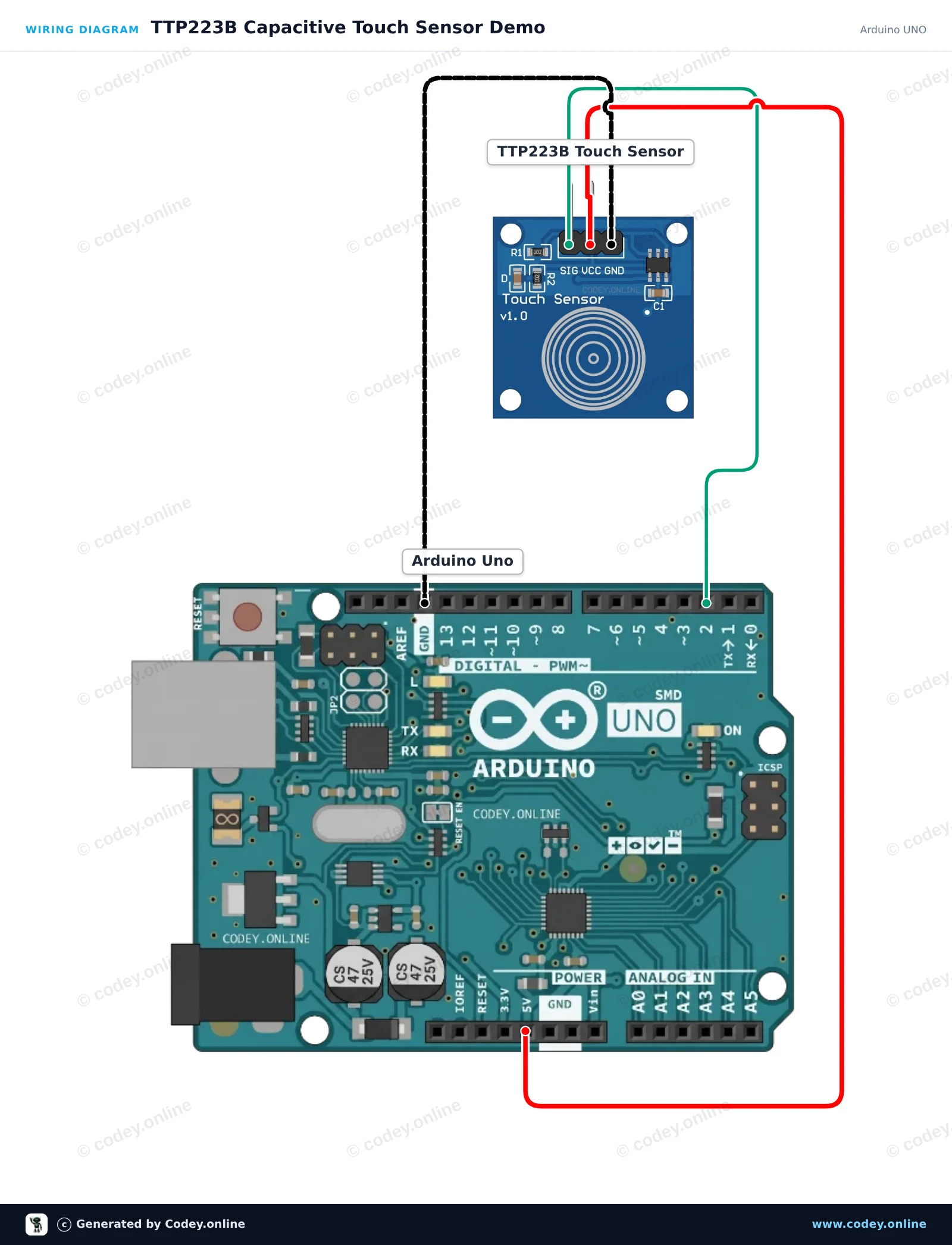
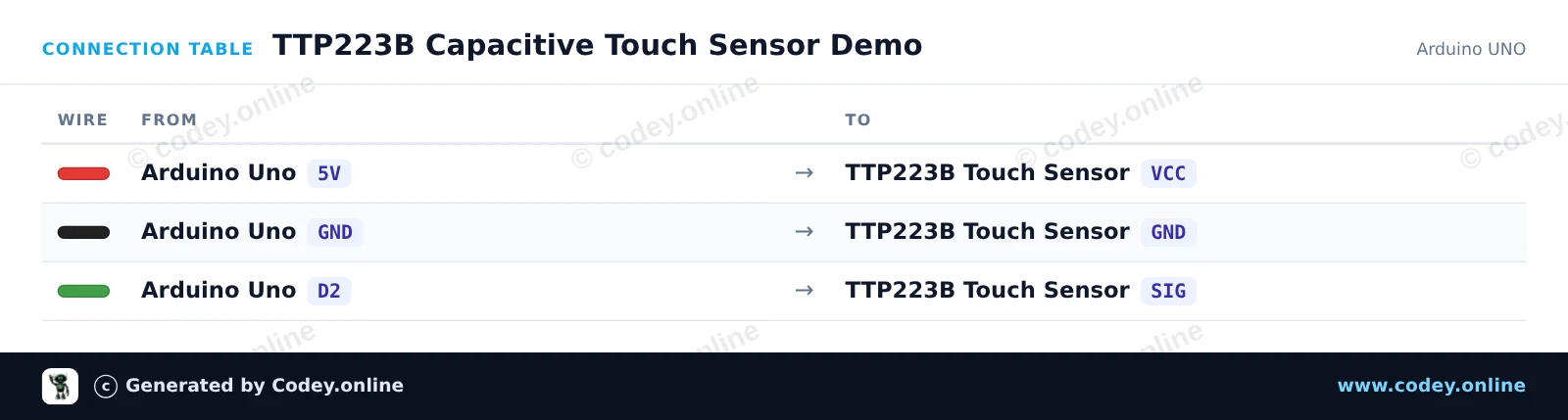
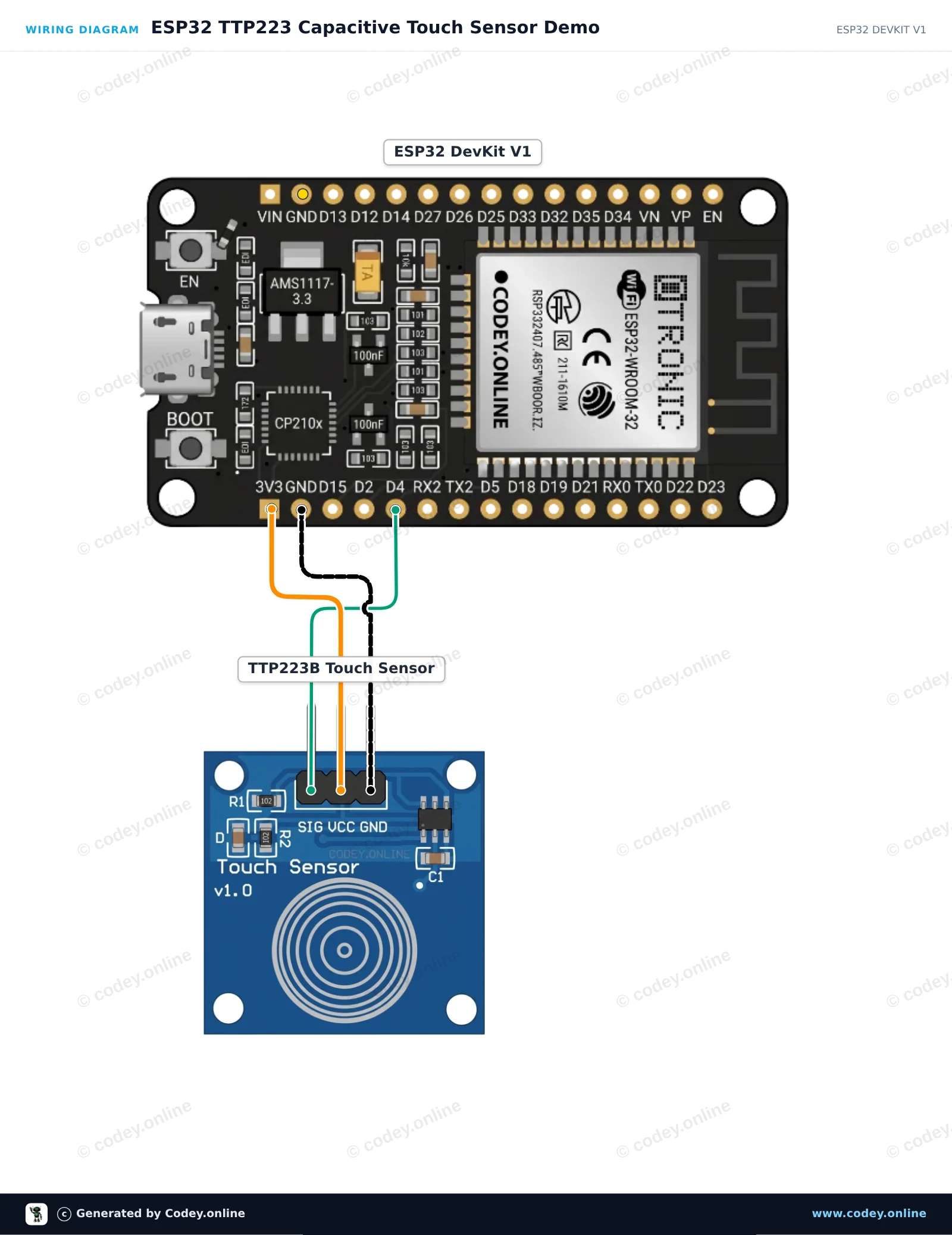
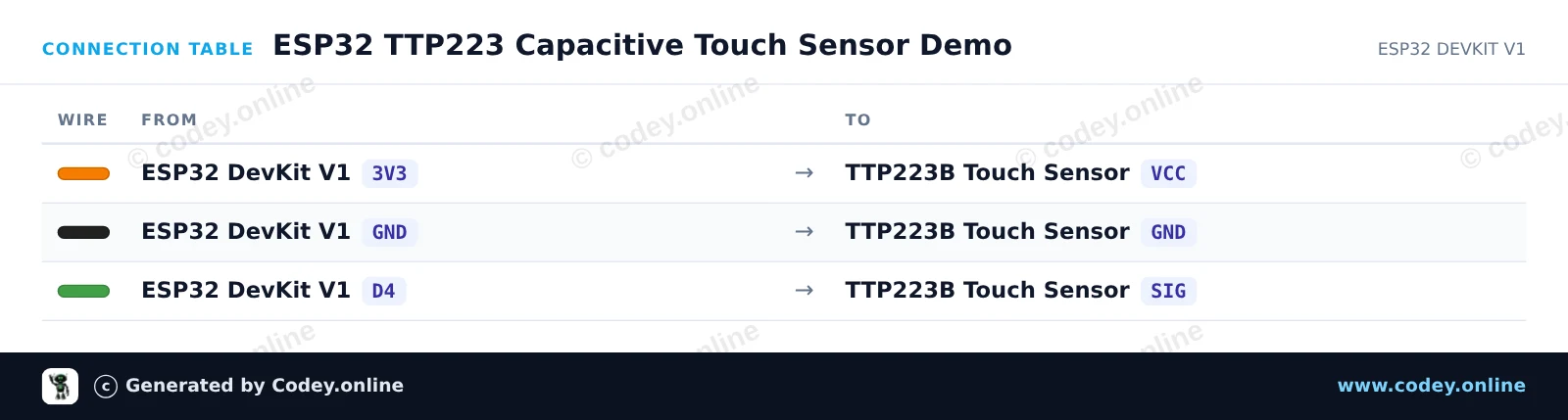
Så här kopplar du Touchsensor TTP223B till en Arduino UNO eller ESP32, med ett exempelsketch som du kan ladda upp direkt.
This project demonstrates the TTP223B capacitive touch sensor module. When you touch the capacitive sensing pad, the sensor outputs a HIGH signal which turns on the Arduino's built-in LED and prints the status to the Serial Monitor.
/*
 * ==================================================================
 *  Generated by Codey.online  —  https://www.codey.online
 * ==================================================================
 *  Project   : TTP223B Capacitive Touch Sensor Demo
 *  Board     : Arduino UNO (arduino:avr:uno)
 *  Parts     : Touch sensor TTP223B
 *  Libraries : none (built-in)
 *
 *  Codey Online is an AI-powered browser IDE for Arduino and ESP32.
 *  Describe your project and Codey writes the code, draws the wiring
 *  diagram and uploads it to your board, straight from the browser.
 *  This code is free to use, modify and share, without warranty.
 * ==================================================================
 */

// Pin definitions
const int touchPin = 2;
const int ledPin = 13;

int lastState = LOW;

void setup() {
  pinMode(touchPin, INPUT);
  pinMode(ledPin, OUTPUT);

  Serial.begin(115200);
  Serial.println(F("TTP223B Touch Sensor Initialized"));
}

void loop() {
  int touchState = digitalRead(touchPin);

  // Control onboard LED based on touch input
  digitalWrite(ledPin, touchState);

  // Print message on state change
  if (touchState != lastState) {
    if (touchState == HIGH) {
      Serial.println(F("Touch detected!"));
    } else {
      Serial.println(F("Touch released."));
    }
    lastState = touchState;
  }

  delay(20);
}Wiring diagram and example code generated by Codey.online — https://www.codey.online
This circuit reads digital signals from the TTP223 capacitive touch sensor and reflects the state on the ESP32's built-in LED. When you touch the sensor pad, the signal pin goes HIGH, illuminating the onboard LED and printing touch events to the Serial Monitor. The module is powered directly with 3.3V for safe logic compatibility.
/*
 * ==================================================================
 *  Generated by Codey.online  —  https://www.codey.online
 * ==================================================================
 *  Project   : ESP32 TTP223 Capacitive Touch Sensor Demo
 *  Board     : ESP32 DEVKIT V1 (esp32:esp32:esp32doit-devkit-v1)
 *  Parts     : Touch sensor TTP223B
 *  Libraries : none (built-in)
 *
 *  Codey Online is an AI-powered browser IDE for Arduino and ESP32.
 *  Describe your project and Codey writes the code, draws the wiring
 *  diagram and uploads it to your board, straight from the browser.
 *  This code is free to use, modify and share, without warranty.
 * ==================================================================
 */

const int TOUCH_PIN = 4;   // D4 on ESP32 DevKit V1
const int LED_PIN   = 2;   // Onboard LED on ESP32 DevKit V1

int lastState = LOW;

void setup() {
  Serial.begin(115200);
  pinMode(TOUCH_PIN, INPUT);
  pinMode(LED_PIN, OUTPUT);
  digitalWrite(LED_PIN, LOW);
  Serial.println("TTP223 Touch Sensor Initialized.");
}

void loop() {
  int touchState = digitalRead(TOUCH_PIN);

  if (touchState != lastState) {
    if (touchState == HIGH) {
      digitalWrite(LED_PIN, HIGH);
      Serial.println("Touch detected!");
    } else {
      digitalWrite(LED_PIN, LOW);
      Serial.println("Touch released.");
    }
    lastState = touchState;
    delay(50); // Simple debounce delay
  }
}Wiring diagram and example code generated by Codey.online — https://www.codey.online





 English
  Nederlands
  Frans
Frans  Deutsch
  Italiano
  Español
  Suomi
Suomi  Polski
  Dansk
Dansk  Ελληνικά
  Български
  Čeština
  Hrvatski
  Aileen