SKU: OT705-D81 Artikelnummer: AA128 EAN: 8720618827890

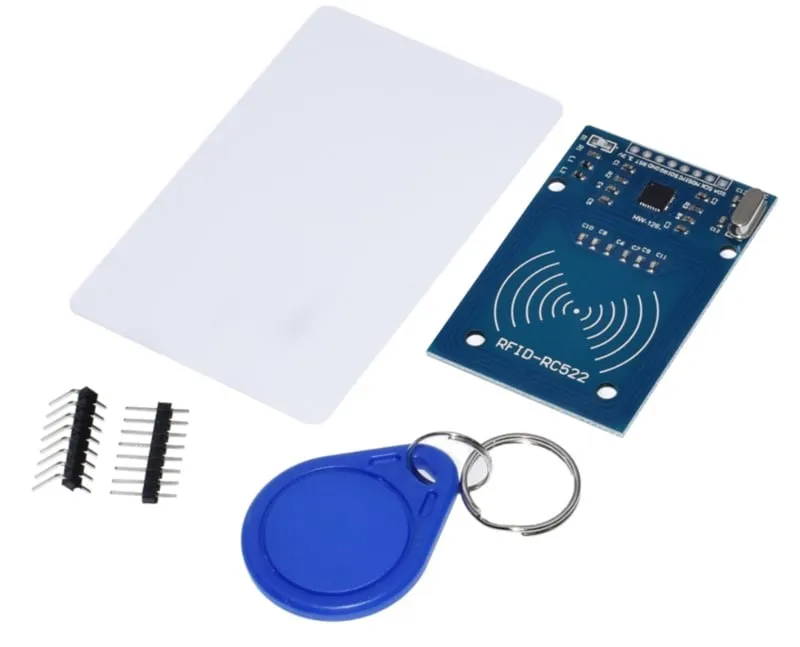
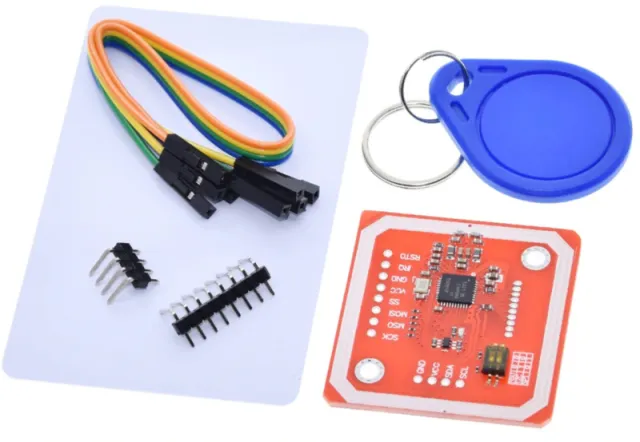
Öppna en dörr med din key tag eller key card Du kan göra det själv med detta RFID (NFC)-kit.
Inklusive S50 Key tag, S50 Key Card, vanliga headers och 90 graders headers.
se här kopplingsschemat och exempel-koden >>>
Arbetsfrekvens: 13.56 MHz
Stödda kort*: Mifare1 S50, Mifare1 S70, Mifare UltraLight, Mifare Pro, Mifare Desfire
Mått: 40mm x 60mm
Spänning: 3.3V DC
Nominell ström: 13-26mA / DC 3.3V
Tomgångsström: 10-13mA / DC 3.3V
Strömförbrukning i viloläge: <80uA
Topström: <30mA
Söktermer: rfid, rfid kit, rfid-kit, rfid set, nfc set, nfc kit
Mått
Längd: 6cm
Bredd: 4cm
Höjd: 0,2cm
Vid uppspelning laddas videon från YouTube.
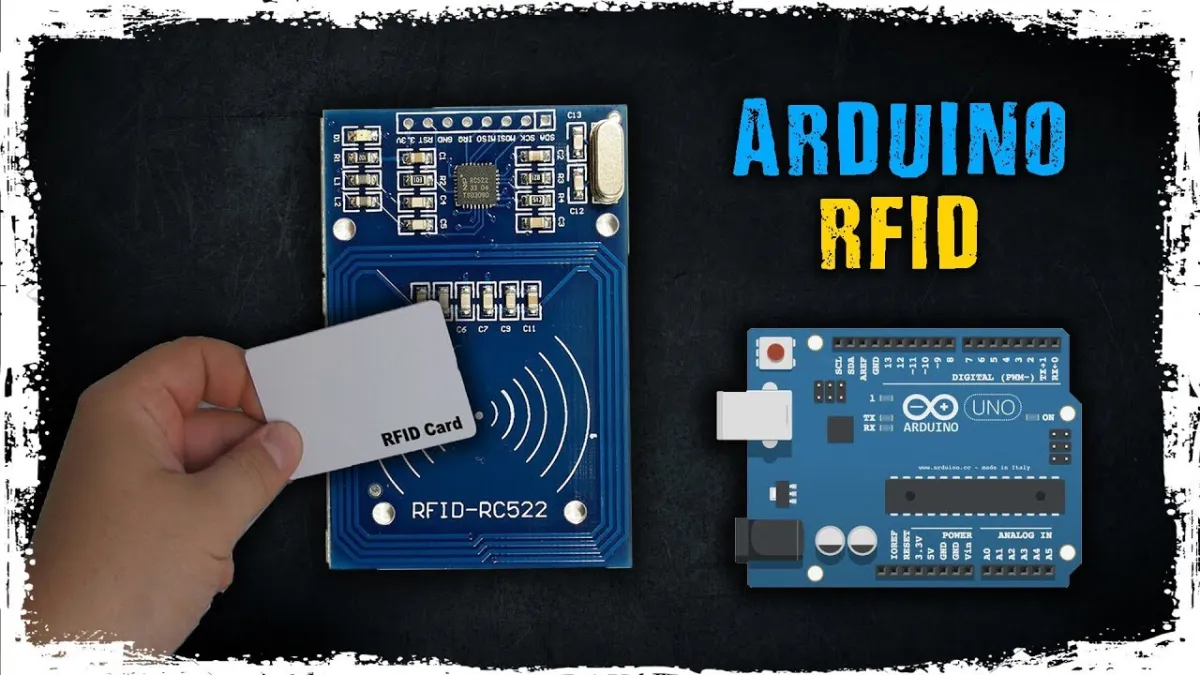
Så här kopplar du RFID-RC522 NFC Kit MFRC522 S50 Mifare inkl. RFID Fudan Card en Key Tag till en Arduino UNO eller ESP32, med ett exempelsketch som du kan ladda upp direkt.
This project reads the unique identifier (UID) and card type from 13.56 MHz RFID cards or key fobs using the RC522 module. An external 4-channel logic level shifter safely translates the Arduino Uno's 5V SPI and control signals to 3.3V. Open the Serial Monitor at 115200 baud and bring a card close to the reader to view its UID.
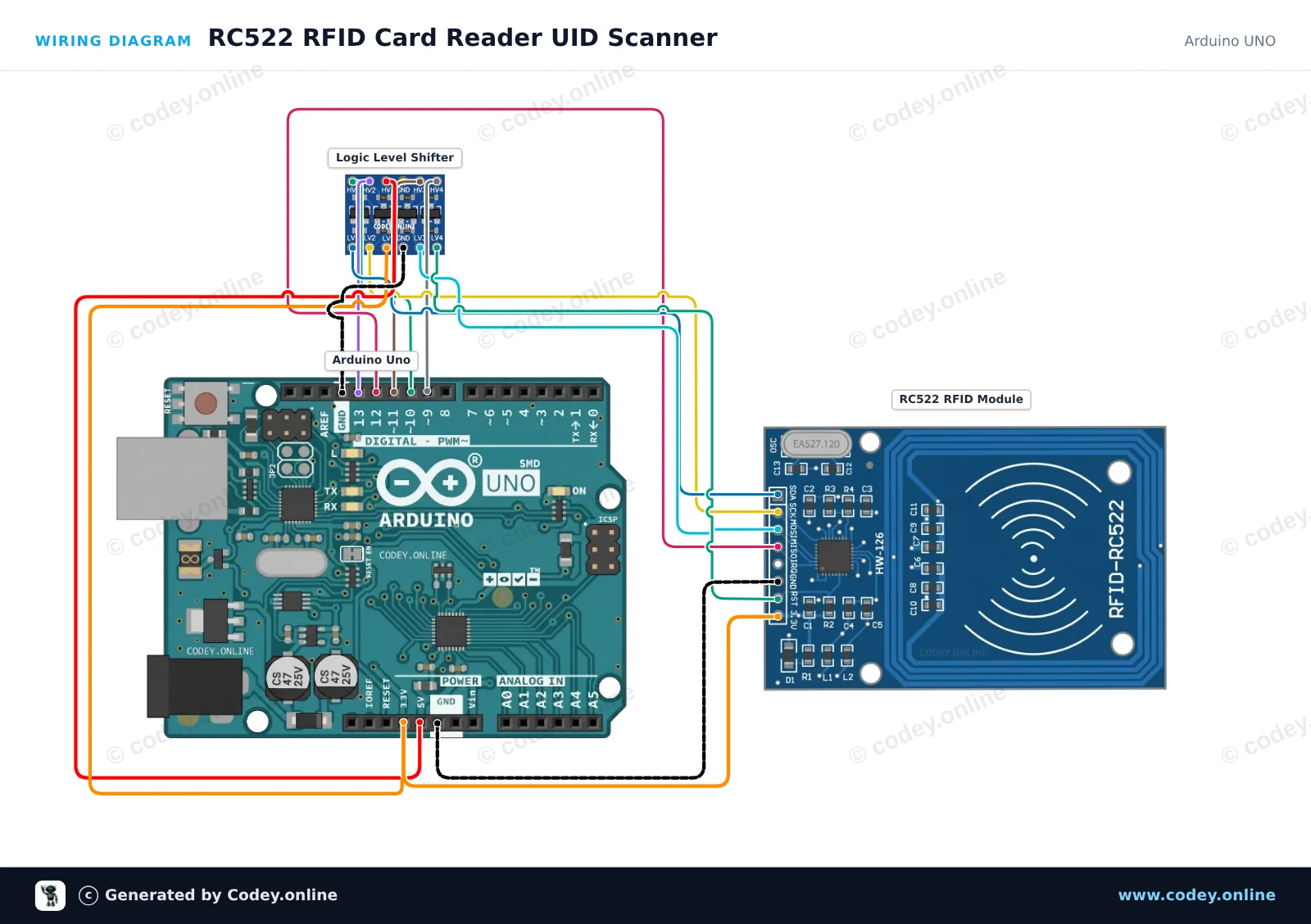
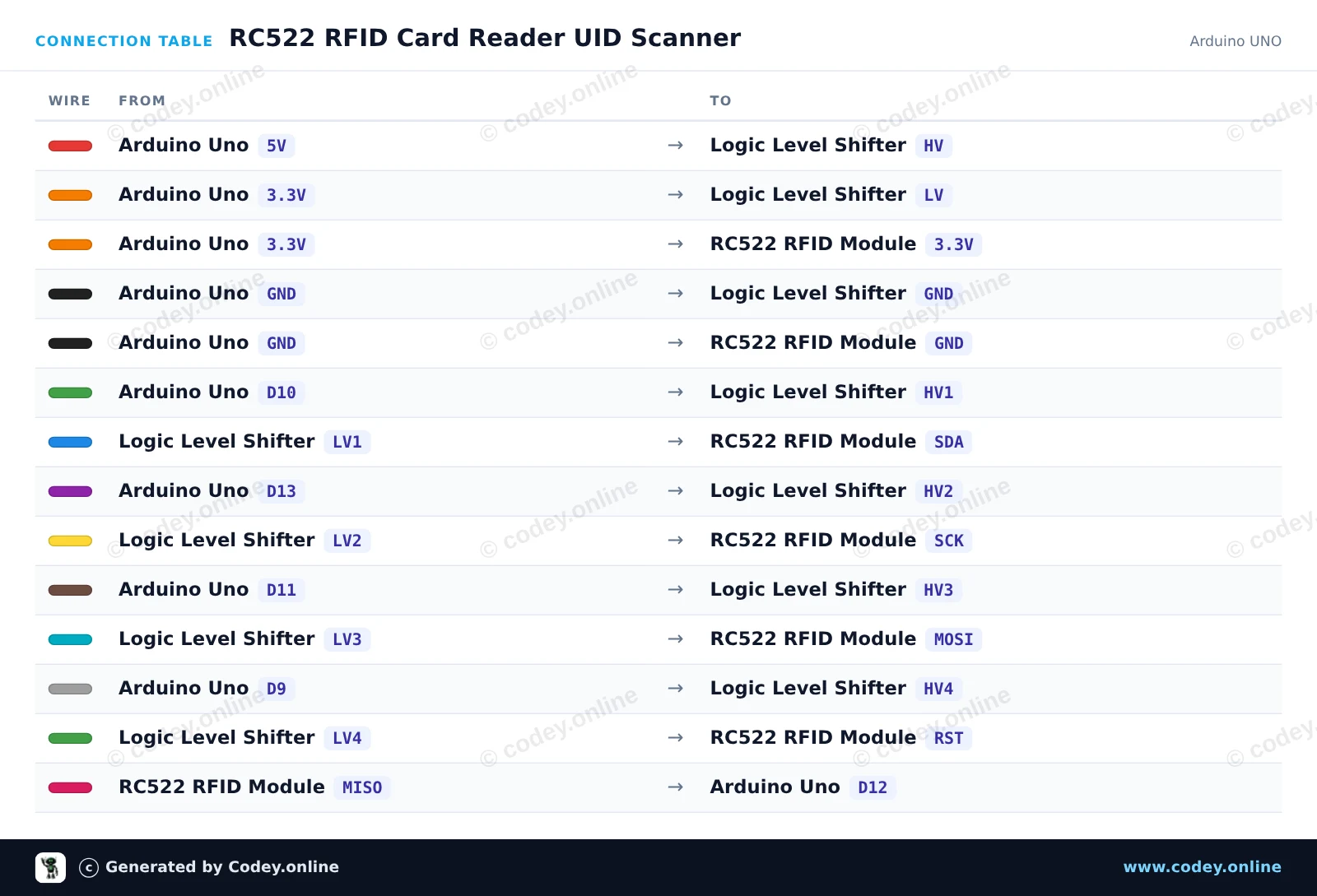
/*
 * ==================================================================
 *  Generated by Codey.online  —  https://www.codey.online
 * ==================================================================
 *  Project   : RC522 RFID Card Reader UID Scanner
 *  Board     : Arduino UNO (arduino:avr:uno)
 *  Parts     : RFID RC522 Module 13.56MHz
 *  Libraries : MFRC522 1.4.12
 *
 *  Codey Online is an AI-powered browser IDE for Arduino and ESP32.
 *  Describe your project and Codey writes the code, draws the wiring
 *  diagram and uploads it to your board, straight from the browser.
 *  This code is free to use, modify and share, without warranty.
 * ==================================================================
 */

#include <SPI.h>
#include <MFRC522.h>

#define SS_PIN 10
#define RST_PIN 9

MFRC522 rfid(SS_PIN, RST_PIN);

void setup() {
  Serial.begin(115200);
  while (!Serial) {
    ; // Wait for serial port
  }

  SPI.begin();
  rfid.PCD_Init();

  Serial.println(F("RC522 RFID Reader Ready."));
  Serial.println(F("Place an RFID card/tag near the antenna..."));
}

void loop() {
  // Look for new RFID cards
  if (!rfid.PICC_IsNewCardPresent() || !rfid.PICC_ReadCardSerial()) {
    return;
  }

  Serial.print(F("Card UID: "));
  for (byte i = 0; i < rfid.uid.size; i++) {
    if (rfid.uid.uidByte[i] < 0x10) {
      Serial.print(F("0"));
    }
    Serial.print(rfid.uid.uidByte[i], HEX);
    if (i < rfid.uid.size - 1) {
      Serial.print(F(" "));
    }
  }
  Serial.println();

  // Print card type
  MFRC522::PICC_Type piccType = rfid.PICC_GetType(rfid.uid.sak);
  Serial.print(F("Card Type: "));
  Serial.println(rfid.PICC_GetTypeName(piccType));
  Serial.println();

  // Stop reading current card
  rfid.PICC_HaltA();
  rfid.PCD_StopCrypto1();
}Nödvändiga bibliotek: MFRC522 1.4.12
Wiring diagram and example code generated by Codey.online — https://www.codey.online
This project reads RFID tags and smart cards using the RC522 13.56 MHz RFID module over SPI. When a card or key fob is brought near the reader, its Unique Identifier (UID) and card type are printed to the Serial Monitor.
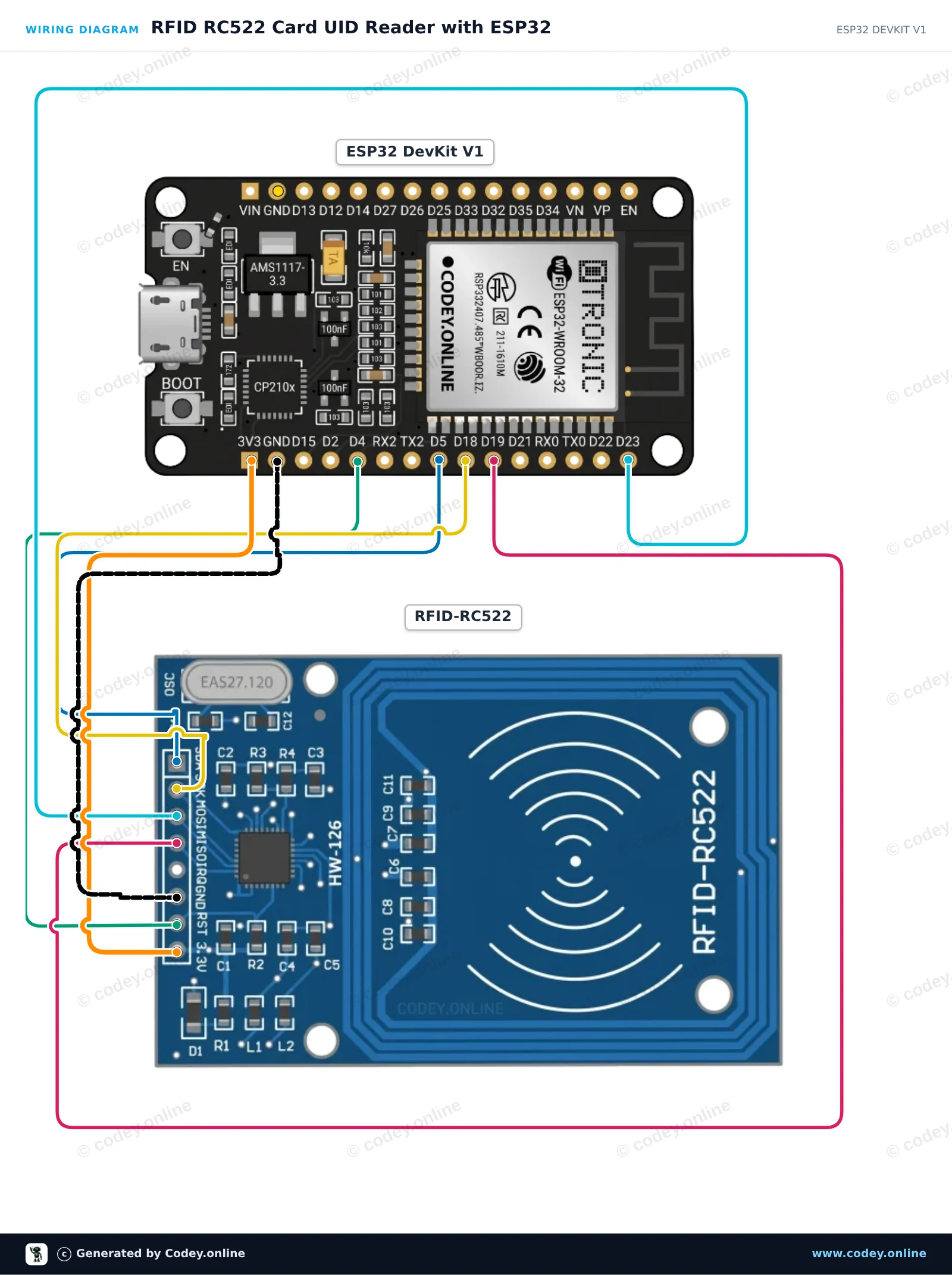
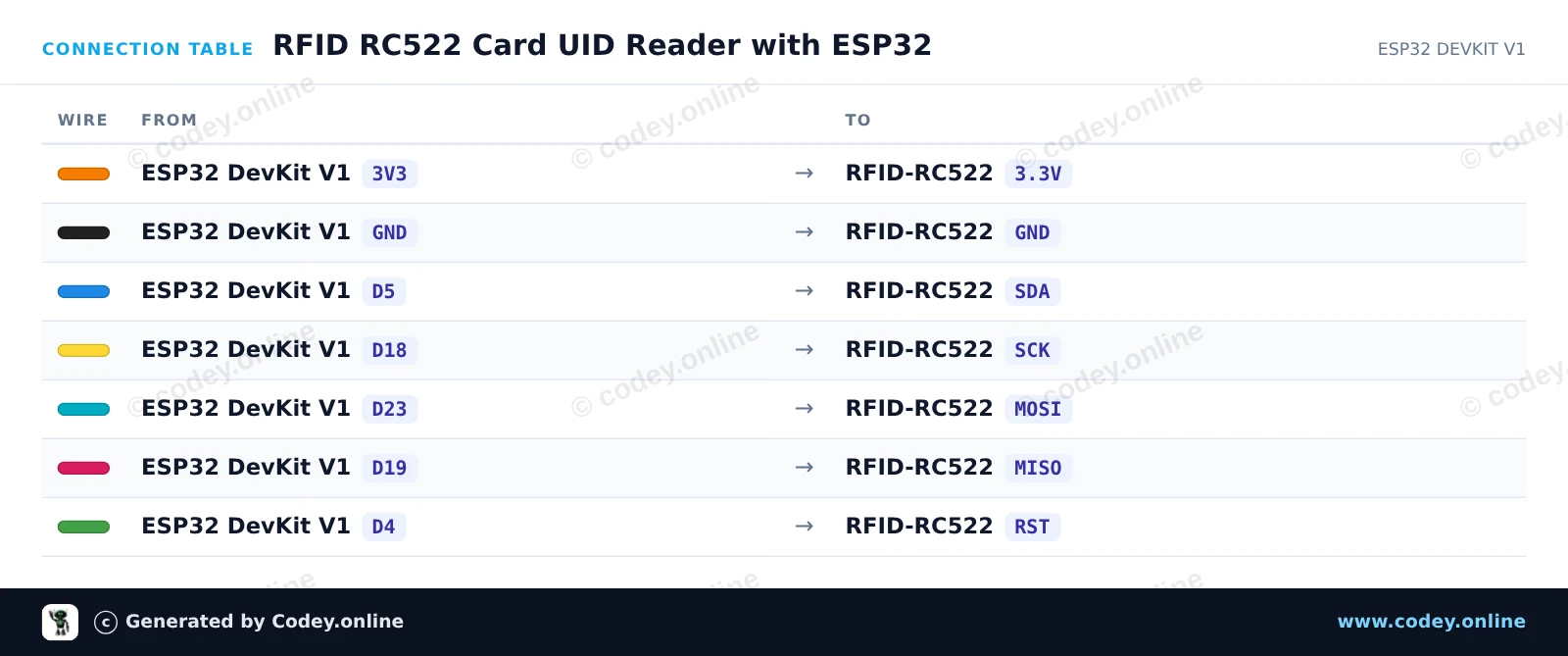
/*
 * ==================================================================
 *  Generated by Codey.online  —  https://www.codey.online
 * ==================================================================
 *  Project   : RFID RC522 Card UID Reader with ESP32
 *  Board     : ESP32 DEVKIT V1 (esp32:esp32:esp32doit-devkit-v1)
 *  Parts     : RFID RC522 Module 13.56MHz
 *  Libraries : MFRC522 1.4.12
 *
 *  Codey Online is an AI-powered browser IDE for Arduino and ESP32.
 *  Describe your project and Codey writes the code, draws the wiring
 *  diagram and uploads it to your board, straight from the browser.
 *  This code is free to use, modify and share, without warranty.
 * ==================================================================
 */

#include <SPI.h>
#include <MFRC522.h>

#define SS_PIN  5
#define RST_PIN 4

MFRC522 rfid(SS_PIN, RST_PIN);

void setup() {
  Serial.begin(115200);
  while (!Serial);

  SPI.begin();     // Initialize SPI bus
  rfid.PCD_Init(); // Initialize MFRC522 reader

  Serial.println("--- RFID RC522 Initialized ---");
  Serial.println("Hold an RFID card or key fob near the reader...");
}

void loop() {
  // Look for new RFID cards
  if (!rfid.PICC_IsNewCardPresent()) {
    return;
  }

  // Select one of the cards
  if (!rfid.PICC_ReadCardSerial()) {
    return;
  }

  // Print Card UID
  Serial.print("Card UID: ");
  for (byte i = 0; i < rfid.uid.size; i++) {
    if (rfid.uid.uidByte[i] < 0x10) {
      Serial.print(" 0");
    } else {
      Serial.print(" ");
    }
    Serial.print(rfid.uid.uidByte[i], HEX);
  }
  Serial.println();

  // Print PICC type
  MFRC522::PICC_Type piccType = rfid.PICC_GetType(rfid.uid.sak);
  Serial.print("Card Type: ");
  Serial.println(rfid.PICC_GetTypeName(piccType));

  // Halt PICC and stop encryption
  rfid.PICC_HaltA();
  rfid.PCD_StopCrypto1();

  delay(1000);
}Nödvändiga bibliotek: MFRC522 1.4.12
Wiring diagram and example code generated by Codey.online — https://www.codey.online










 English
  Nederlands
  Frans
Frans  Deutsch
  Italiano
  Español
  Suomi
Suomi  Polski
  Dansk
Dansk  Ελληνικά
  Български
  Čeština
  Hrvatski
  Aileen