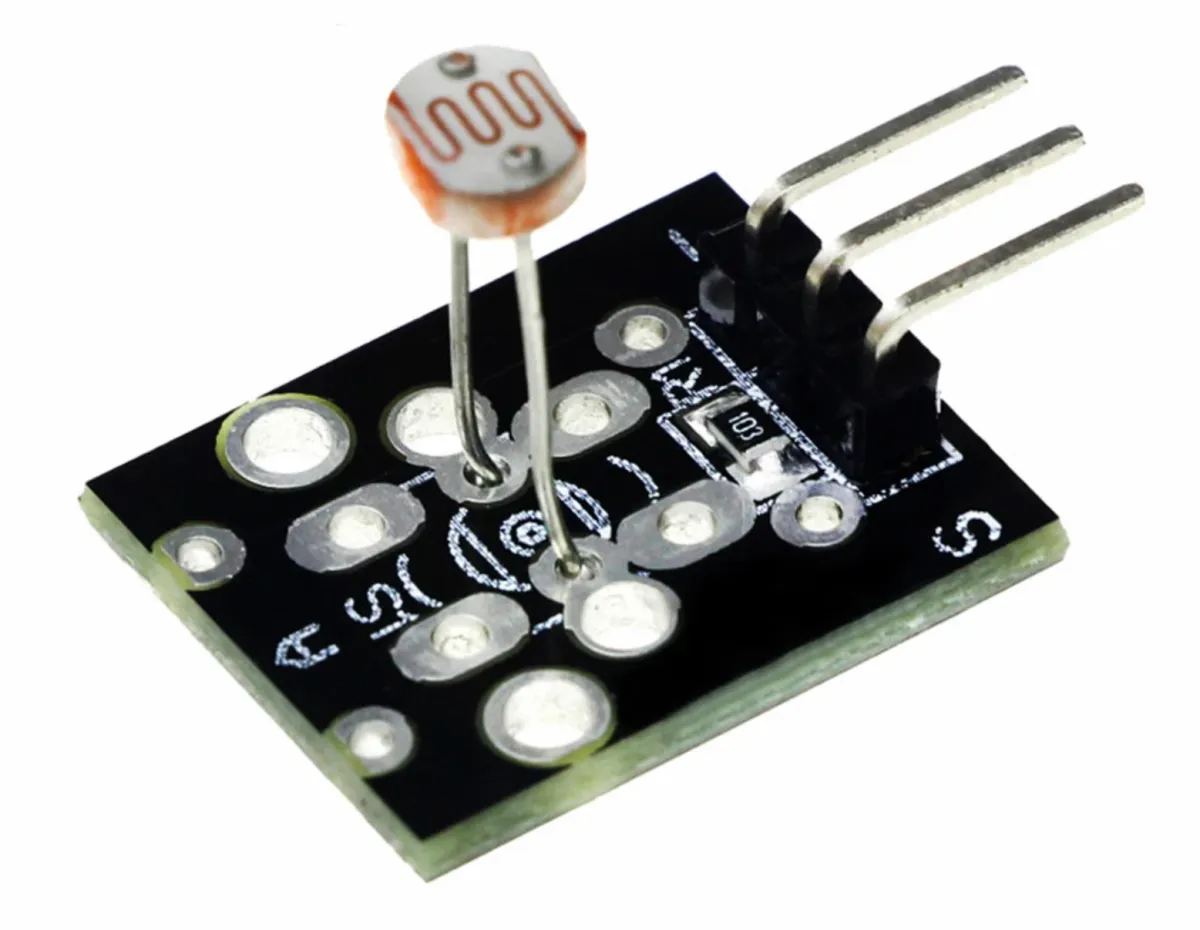
SKU: OT8342 Artikelnummer: AB028 EAN: 8720828223451

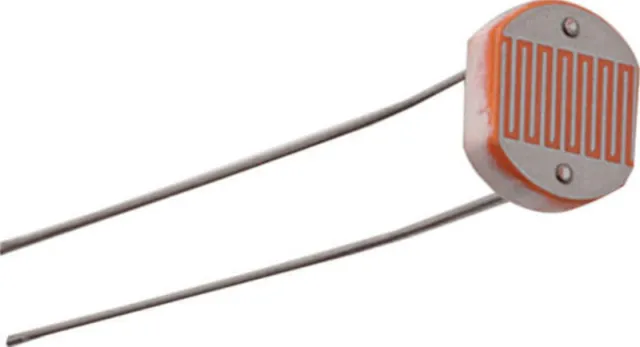
LDR är förkortningen för Light Dependent Resistor. En LDR är en fotoresistor, det vill säga ett motstånd som ändrar sitt motstånd som reaktion på förändringar i ljusnivån som det utsätts för. När mer ljus faller på LDR:n minskar motståndet, och när det är mindre ljus ökar motståndet. Denna egenskap gör LDR:n lämplig för tillämpningar som ljuskänsliga kretsar och automatisering.
Kan användas för både Arduino och ESP32, ESP8266, Rapberry Pi, Pi Pico och även i kretsar utan en mikrokontroller.
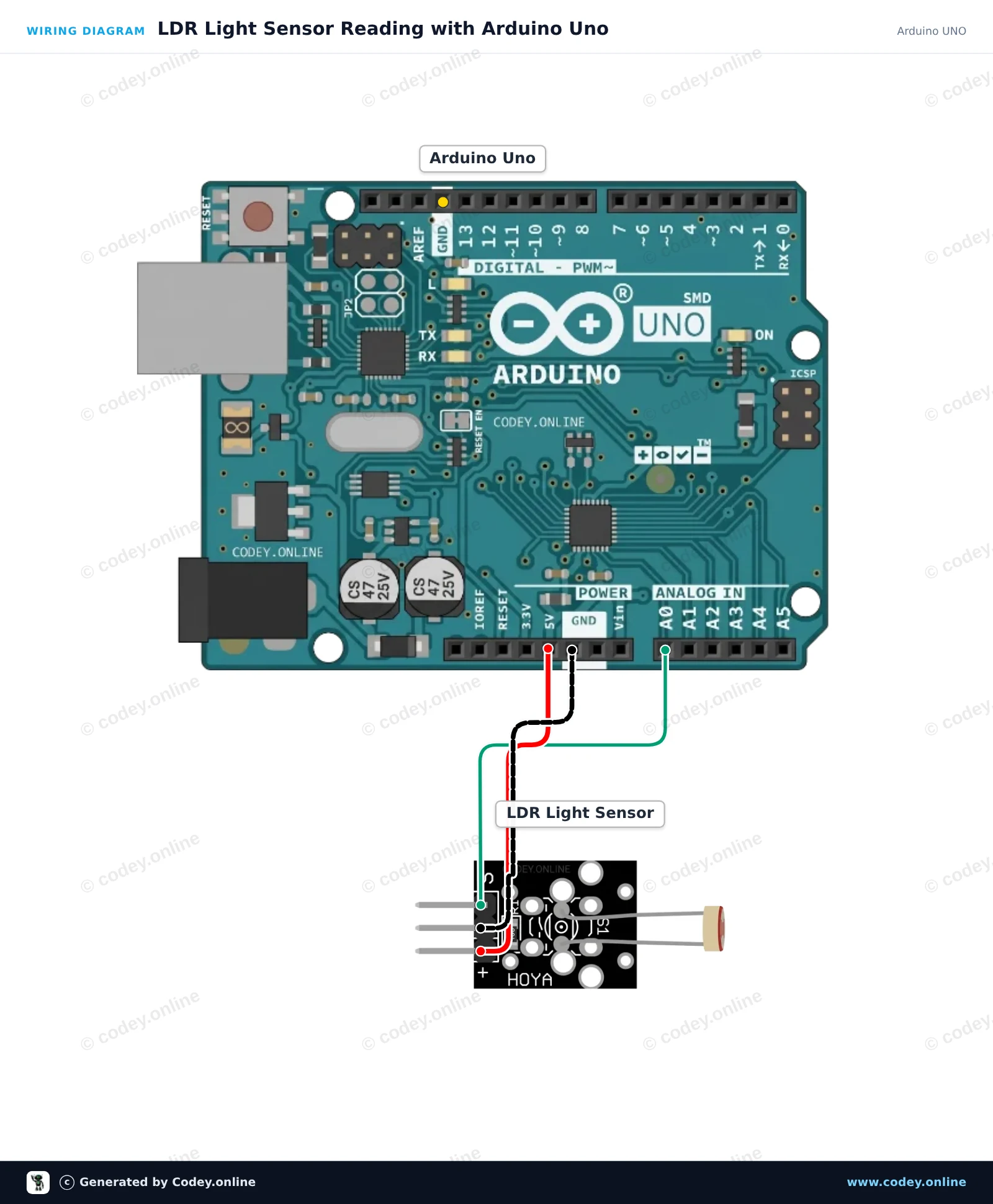
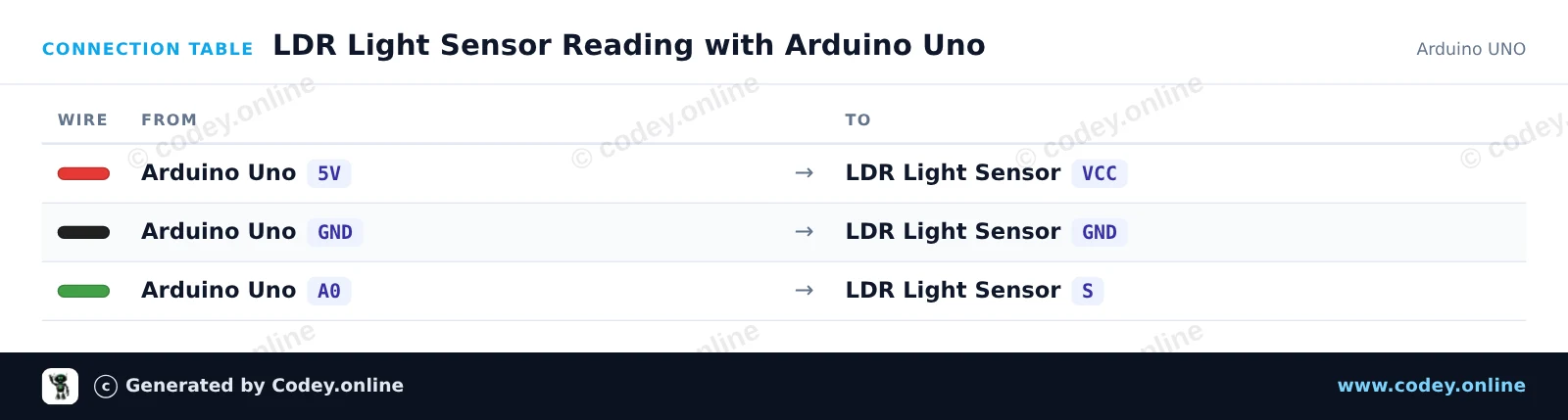
Så här kopplar du Ljuskänslig LDR-sensormodul till en Arduino UNO eller ESP32, med ett exempelsketch som du kan ladda upp direkt.
This project measures ambient light levels using an LDR light sensor module connected to the Arduino Uno analog input A0. The Arduino reads the analog voltage, maps the light intensity, and prints the raw reading to the Serial Monitor. Covering the sensor will change the reading in real time.
/*
 * ==================================================================
 *  Generated by Codey.online  —  https://www.codey.online
 * ==================================================================
 *  Project   : LDR Light Sensor Reading with Arduino Uno
 *  Board     : Arduino UNO (arduino:avr:uno)
 *  Parts     : LDR Light Sensor Module
 *  Libraries : none (built-in)
 *
 *  Codey Online is an AI-powered browser IDE for Arduino and ESP32.
 *  Describe your project and Codey writes the code, draws the wiring
 *  diagram and uploads it to your board, straight from the browser.
 *  This code is free to use, modify and share, without warranty.
 * ==================================================================
 */

const int ldrPin = A0;
const int ledPin = 13;

void setup() {
  Serial.begin(115200);
  pinMode(ledPin, OUTPUT);
  Serial.println(F("LDR Light Sensor Initialized"));
}

void loop() {
  int rawValue = analogRead(ldrPin);
  float voltage = rawValue * (5.0 / 1023.0);

  Serial.print(F("Raw: "));
  Serial.print(rawValue);
  Serial.print(F(" | Voltage: "));
  Serial.print(voltage, 2);
  Serial.print(F(" V | Status: "));

  // Turn on built-in LED if light level drops below threshold
  if (rawValue < 400) {
    digitalWrite(ledPin, HIGH);
    Serial.println(F("Dark (LED ON)"));
  } else {
    digitalWrite(ledPin, LOW);
    Serial.println(F("Bright (LED OFF)"));
  }

  delay(300);
}Wiring diagram and example code generated by Codey.online — https://www.codey.online
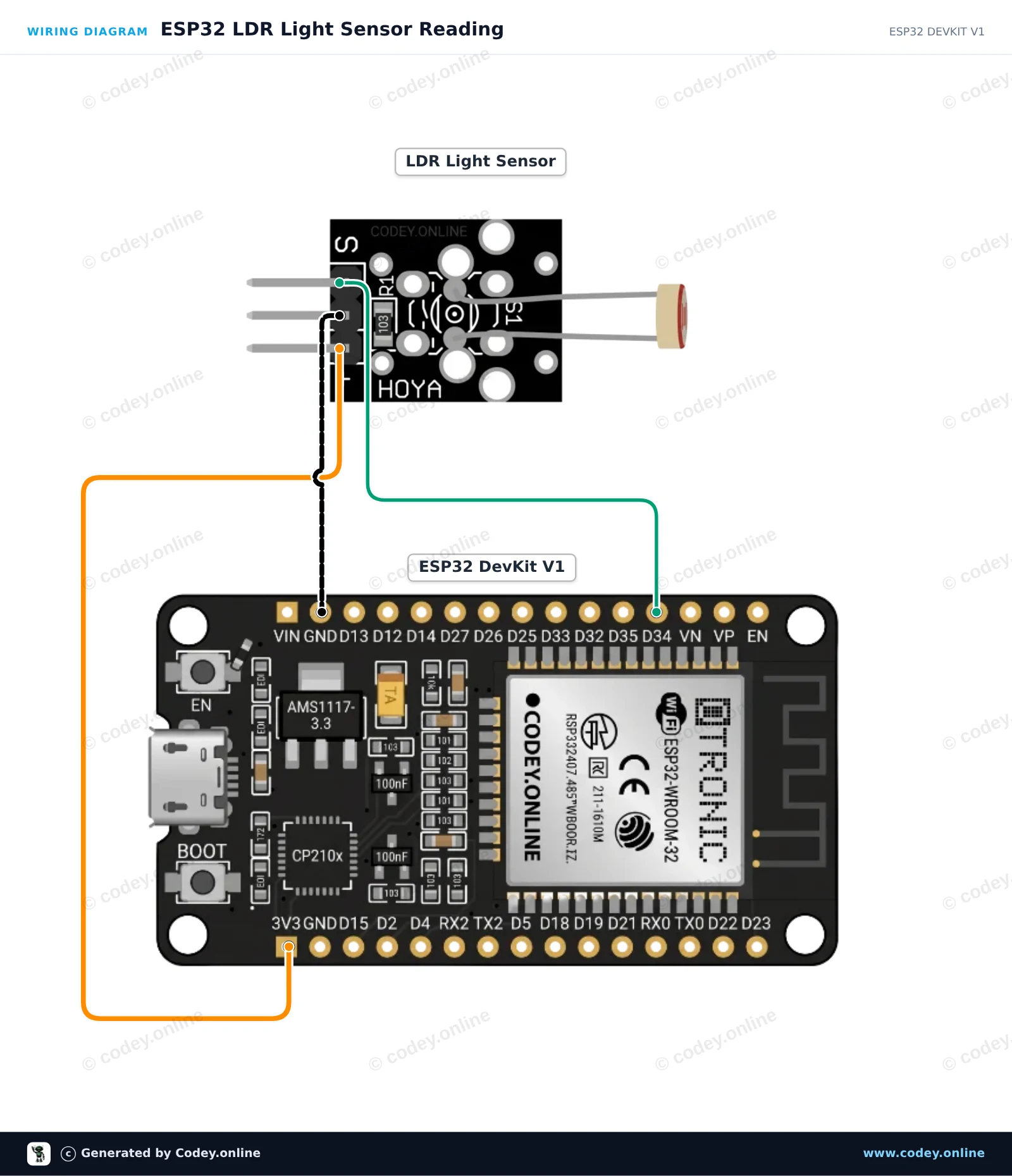
This project demonstrates reading ambient light levels using an LDR light sensor module connected to the ESP32. The module outputs an analog voltage proportional to light intensity, which is read via GPIO 34. Open the Serial Monitor at 115200 baud to view real-time light readings.
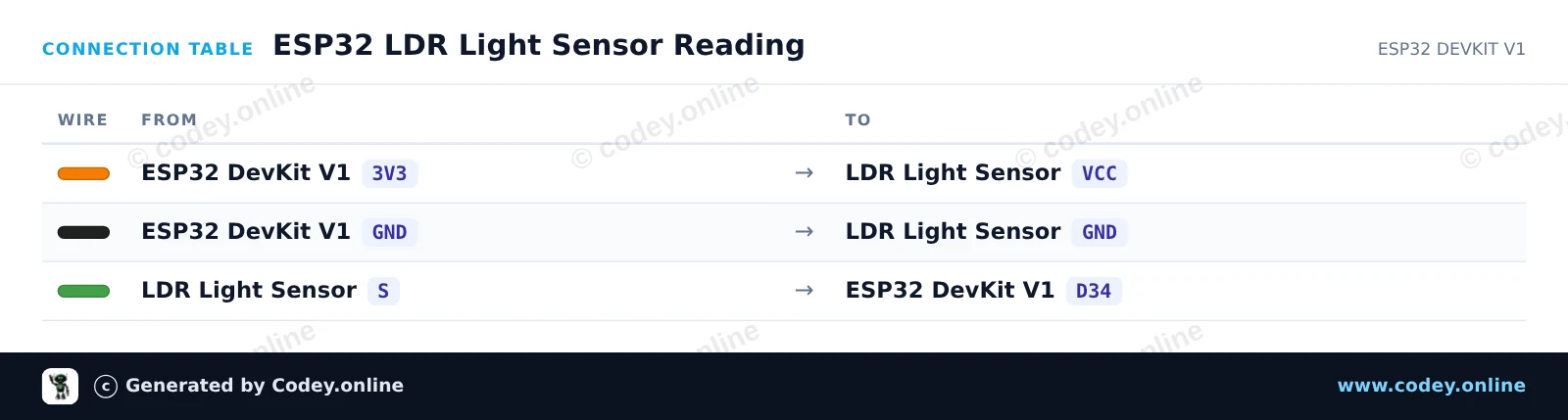
/*
 * ==================================================================
 *  Generated by Codey.online  —  https://www.codey.online
 * ==================================================================
 *  Project   : ESP32 LDR Light Sensor Reading
 *  Board     : ESP32 DEVKIT V1 (esp32:esp32:esp32doit-devkit-v1)
 *  Parts     : LDR Light Sensor Module
 *  Libraries : none (built-in)
 *
 *  Codey Online is an AI-powered browser IDE for Arduino and ESP32.
 *  Describe your project and Codey writes the code, draws the wiring
 *  diagram and uploads it to your board, straight from the browser.
 *  This code is free to use, modify and share, without warranty.
 * ==================================================================
 */

// LDR Light Sensor Demo for ESP32
const int LDR_PIN = 34;

void setup() {
  Serial.begin(115200);
  delay(1000);
  Serial.println("ESP32 LDR Light Sensor Demo");
}

void loop() {
  // Read the analog value (0 - 4095 on ESP32 12-bit ADC)
  int rawValue = analogRead(LDR_PIN);

  // Convert to approximate percentage
  float percentage = (rawValue / 4095.0) * 100.0;

  Serial.print("Raw ADC: ");
  Serial.print(rawValue);
  Serial.print(" | Light Level: ");
  Serial.print(percentage, 1);
  Serial.println("%");

  delay(500);
}Wiring diagram and example code generated by Codey.online — https://www.codey.online





 English
  Nederlands
  Frans
Frans  Deutsch
  Italiano
  Español
  Suomi
Suomi  Polski
  Dansk
Dansk  Ελληνικά
  Български
  Čeština
  Hrvatski
  Aileen