SKU: OT2118-A47 Artikelnummer: NA509 EAN: 8324968584702

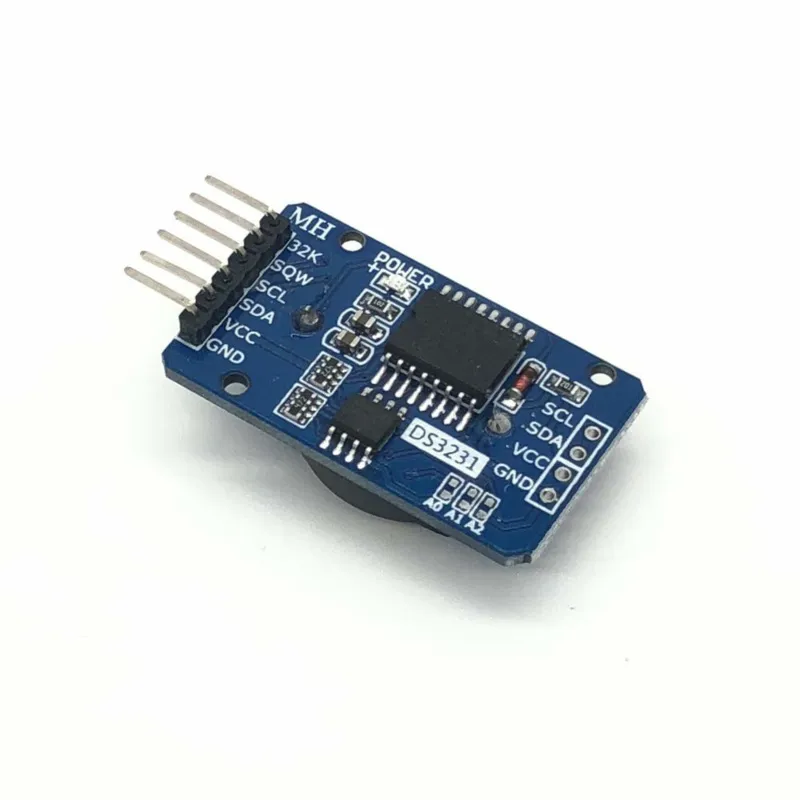
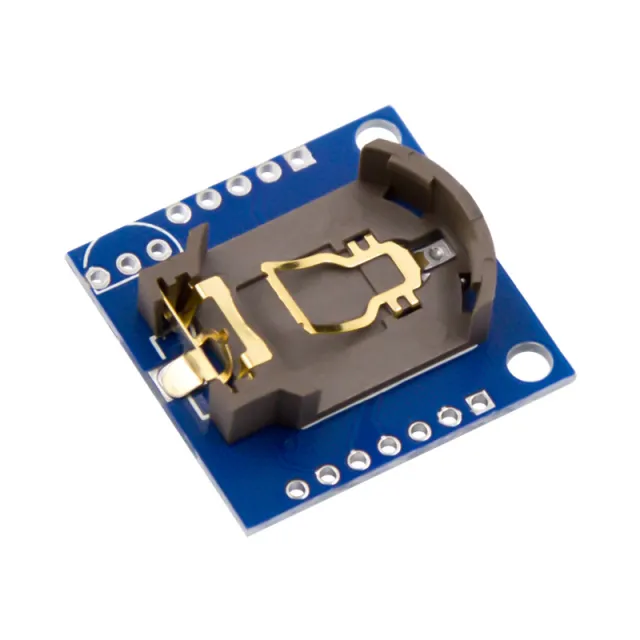
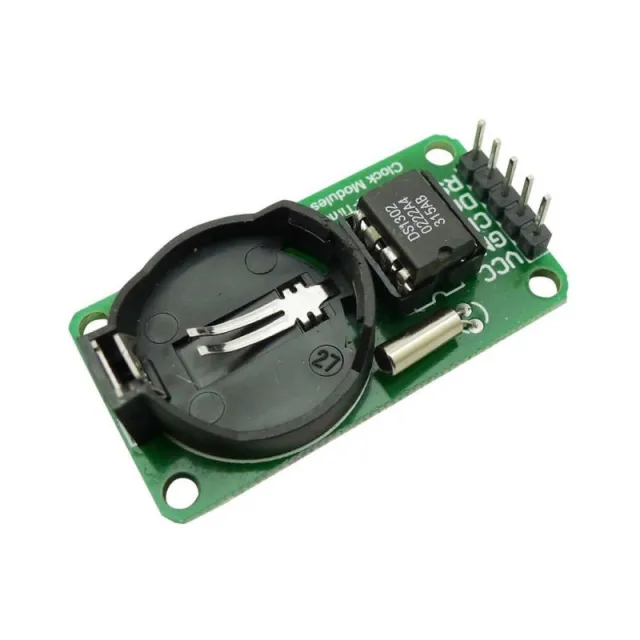
Real time clock-modul med DS3231-chipet (. Denna modul ser till att Arduino alltid känner till den exakta tiden. Genom att ansluta Arduino till ´sqw´-pinnen är det möjligt att generera ett avbrott varje sekund, vilket gör att sensorvärden eller en display kan aktiveras.
Kommunikation: I2C-gränssnitt.
Håller tiden exakt, även när modulen inte är ansluten (backupbatteri)
År - månad - dag timme : minut : sekund
Anslutning för extern trigger med intervall (1Hz, 4kHz, 8kHz, 32kHz)
56 Bytes icke-flyktigt minne
Högre precision än DS1307
Extra minneschip: AT24C32 (32K bytes)
Inbyggd temperatursensor (avvikelse på ±3 °C)
Levereras utan batteri
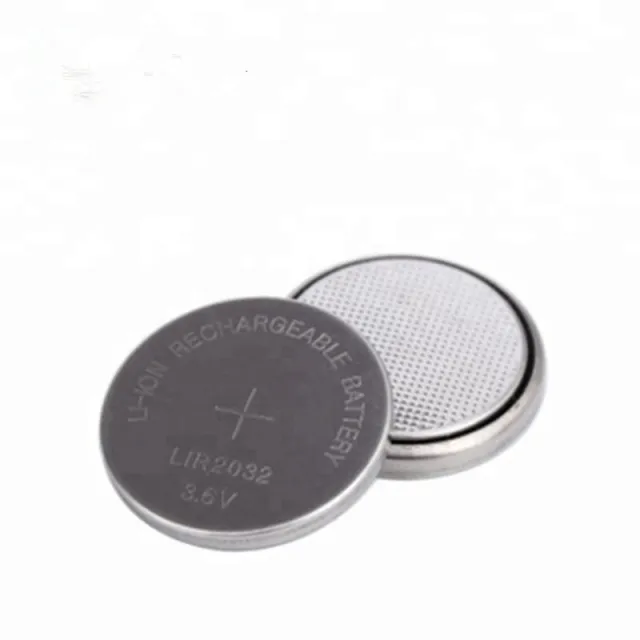
Observera använd uppladdningsbart batteri LIR2032
Mått
Längd: 3,9cm
Bredd: 2,2cm
Höjd: 1,2cm
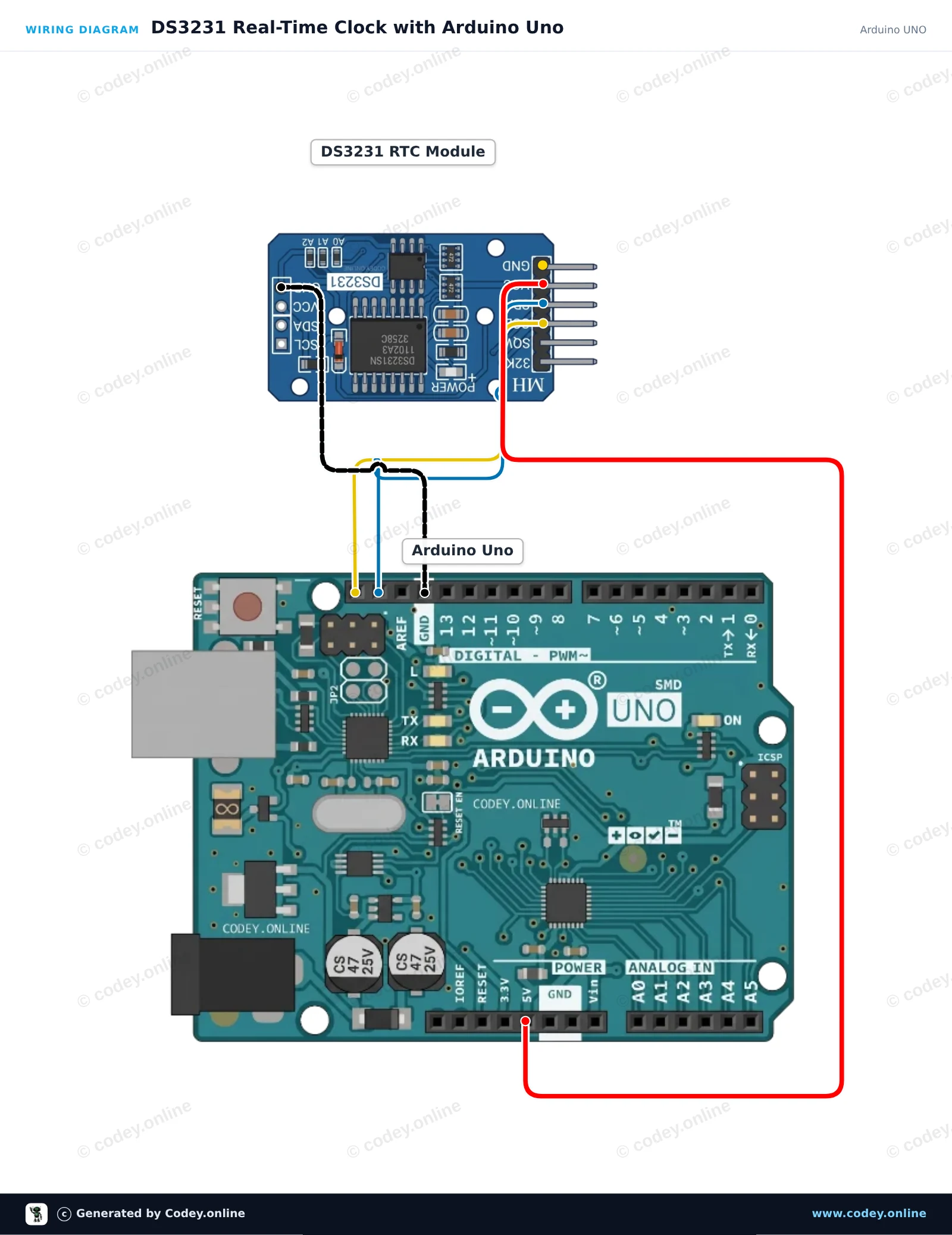
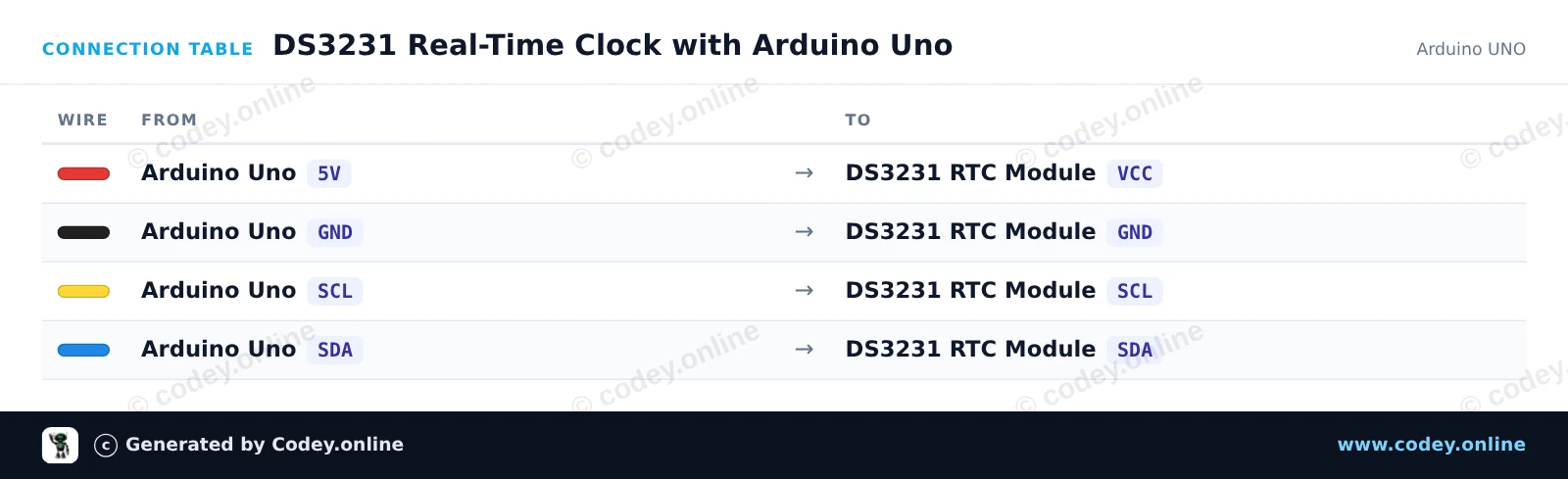
Så här kopplar du DS3231 Real Time Clock Module I2C (RTC hög precision) till en Arduino UNO eller ESP32, med ett exempelsketch som du kan ladda upp direkt.
This project connects a high-precision DS3231 RTC module to an Arduino Uno over I2C. The sketch sets the RTC to the compile time if power was lost, then reads and prints the formatted date, time, and onboard temperature sensor readings to the Serial Monitor every second.
/*
 * ==================================================================
 *  Generated by Codey.online  —  https://www.codey.online
 * ==================================================================
 *  Project   : DS3231 Real-Time Clock with Arduino Uno
 *  Board     : Arduino UNO (arduino:avr:uno)
 *  Parts     : DS3231 Real Time Clock Module I2C
 *  Libraries : RTClib 2.1.4
 *
 *  Codey Online is an AI-powered browser IDE for Arduino and ESP32.
 *  Describe your project and Codey writes the code, draws the wiring
 *  diagram and uploads it to your board, straight from the browser.
 *  This code is free to use, modify and share, without warranty.
 * ==================================================================
 */

#include <Wire.h>
#include <RTClib.h>

RTC_DS3231 rtc;

void setup() {
  Serial.begin(115200);
  while (!Serial);

  if (!rtc.begin()) {
    Serial.println(F("Couldn't find DS3231 RTC"));
    while (1) delay(10);
  }

  if (rtc.lostPower()) {
    Serial.println(F("RTC lost power, setting time to compile time..."));
    rtc.adjust(DateTime(F(__DATE__), F(__TIME__)));
  }

  Serial.println(F("DS3231 RTC initialized."));
}

void loop() {
  DateTime now = rtc.now();

  char dateBuffer[11];
  char timeBuffer[9];
  snprintf(dateBuffer, sizeof(dateBuffer), "%04d-%02d-%02d", now.year(), now.month(), now.day());
  snprintf(timeBuffer, sizeof(timeBuffer), "%02d:%02d:%02d", now.hour(), now.minute(), now.second());

  Serial.print(F("Date: "));
  Serial.print(dateBuffer);
  Serial.print(F(" | Time: "));
  Serial.print(timeBuffer);
  Serial.print(F(" | Temp: "));
  Serial.print(rtc.getTemperature());
  Serial.println(F(" C"));

  delay(1000);
}Nödvändiga bibliotek: RTClib 2.1.4
Wiring diagram and example code generated by Codey.online — https://www.codey.online
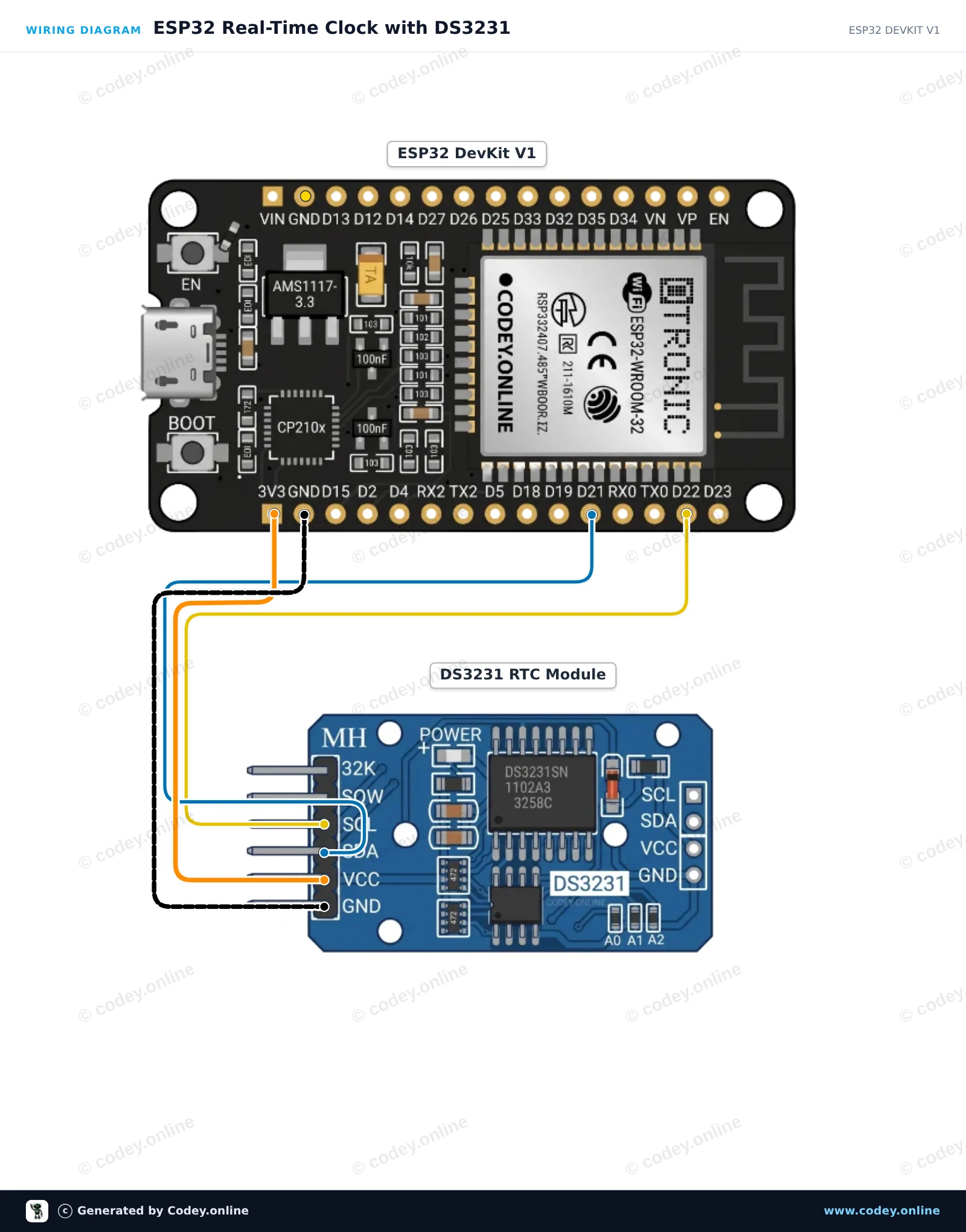
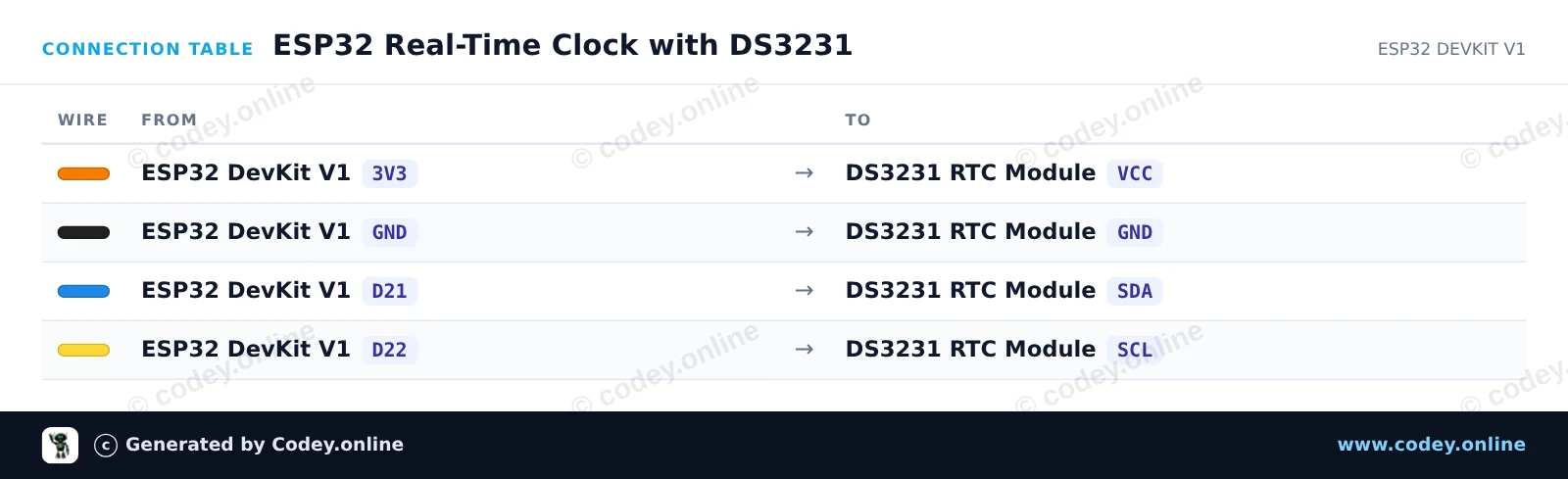
This project reads the current date, time, and internal temperature from the DS3231 Real Time Clock module over I2C. Connect the module to the ESP32's 3.3V rail and default I2C pins, then open the Serial Monitor at 115200 baud to view the live timestamp.
/*
 * ==================================================================
 *  Generated by Codey.online  —  https://www.codey.online
 * ==================================================================
 *  Project   : ESP32 Real-Time Clock with DS3231
 *  Board     : ESP32 DEVKIT V1 (esp32:esp32:esp32doit-devkit-v1)
 *  Parts     : DS3231 Real Time Clock Module I2C
 *  Libraries : RTClib 2.1.4
 *
 *  Codey Online is an AI-powered browser IDE for Arduino and ESP32.
 *  Describe your project and Codey writes the code, draws the wiring
 *  diagram and uploads it to your board, straight from the browser.
 *  This code is free to use, modify and share, without warranty.
 * ==================================================================
 */

#include <Wire.h>
#include "RTClib.h"

RTC_DS3231 rtc;

void setup() {
  Serial.begin(115200);
  while (!Serial) { delay(10); }

  Wire.begin(21, 22); // SDA = GPIO 21, SCL = GPIO 22

  if (!rtc.begin()) {
    Serial.println("Couldn't find DS3231 RTC module!");
    while (1) delay(10);
  }

  if (rtc.lostPower()) {
    Serial.println("RTC lost power, setting time to compilation time!");
    rtc.adjust(DateTime(F(__DATE__), F(__TIME__)));
  }
}

void loop() {
  DateTime now = rtc.now();

  char buffer[30];
  snprintf(buffer, sizeof(buffer), "%04d-%02d-%02d %02d:%02d:%02d",
           now.year(), now.month(), now.day(),
           now.hour(), now.minute(), now.second());

  Serial.print("Current Time: ");
  Serial.print(buffer);
  Serial.print(" | Temp: ");
  Serial.print(rtc.getTemperature());
  Serial.println(" °C");

  delay(1000);
}Nödvändiga bibliotek: RTClib 2.1.4
Wiring diagram and example code generated by Codey.online — https://www.codey.online







 English
  Nederlands
  Frans
Frans  Deutsch
  Italiano
  Español
  Suomi
Suomi  Polski
  Dansk
Dansk  Ελληνικά
  Български
  Čeština
  Hrvatski
  Aileen